
A useful resume Skills section lets someone find the abilities needed for the advertised job without searching through a crowded list. Start with the posting, keep only skills you can actually demonstrate, use familiar headings, and choose a layout that fits your history. The best format is not always a longer list: sometimes four closely related, well-supported skills are better than a page of unexplained software and personality labels.
Choose Whether a Dedicated Skills Section Helps
Use a dedicated section when the opening names specific tools, methods, platforms, languages, or processes and you truly have them. This is especially helpful if your skills appear across several jobs or projects. If your experience bullets already demonstrate all the relevant abilities and the page is crowded, a shorter Skills line may work better. The decision depends on what the employer needs to locate quickly, not on an arbitrary requirement that every resume must have a long keyword box.
CareerOneStop provides resume-structure guidance that emphasizes matching the document to your job target. Look at the vacancy and underline concrete requirements. For a clerical opening, you might prioritize calendar coordination, document formatting, and data entry if you have those skills. For a barista role, point-of-sale familiarity and order accuracy may matter more. Do not replace evidence in your work history with a standalone inventory of skills; both sections should support each other.
Use Recognizable Headings and Plain Text
A heading such as “Skills,” “Technical Skills,” or “Relevant Skills” clearly signals the section. Use regular selectable text and simple separators, not a decorative graphic that contains the only copy of your abilities. CareerOneStop’s formatting advice explicitly identifies standard headings such as Skills. If you divide the section into groups, use labels that describe meaningful clusters: “Software,” “Records,” and “Languages,” for example. Avoid inventing ornamental levels, spider charts, or icons that force readers to interpret a private rating system.
A short sample might read: “Skills: Spreadsheet filtering and formulas; appointment scheduling; customer correspondence; document proofreading.” Each phrase must match a real capability. If the employer needs a specific software platform, name that application only after you have used it. Keep punctuation and capitalization consistent. Read the section without colors or sidebars to check that it still makes sense. The goal is to make information visible to humans and parsable as text, without promising that one formatting choice guarantees an automated screening outcome.

Group Only When Groups Reduce Search Time
For a technical or multi-disciplinary position, two or three clusters can shorten the search. A hypothetical administrative applicant might write “Scheduling: shared calendars, appointment reminders” and “Records: spreadsheet updates, file naming and version tracking.” Those clusters answer different job needs. Putting everything under “Office” would obscure the distinction, while splitting every phrase into its own category adds clutter. A retail applicant with four skills may be better served by one plain line.
Choose groups by employer tasks rather than by flattering labels. “Expert Skills” means little without context. “Reporting Tools” is useful if several tools actually support reporting. Do not mix credentials with skills that have not been verified; a license should be listed accurately in the relevant credentials area. Keep work samples or experience bullets nearby so that the section does not resemble an unsubstantiated claim sheet. A reader should be able to connect each label to something you have done.
Order Skills Using the Posting Rather Than Trends
Read the actual description before deciding which item goes first. A hiring manager seeking a payroll specialist may need to see specific record checks before generic teamwork language. A support desk may care about ticket documentation and issue triage. Order the strongest verified matches first, then add useful adjacent skills. Do not insert every phrase in the advertisement simply because it looks searchable. Requirements you do not meet should not be hidden by an invented synonym.
Use a quick relevance scale for your private working notes: essential to the posting, helpful but secondary, or unrelated. The scale is an editing aid, not a claim about a recruiter’s scoring formula. Check where proof lives for each essential item: job bullet, class assignment, documented volunteer project, or work sample. If no proof is available, ask whether you really need the claim. The priority order may change for a different posting; maintaining a small master inventory outside your resume makes honest tailoring easier.

Avoid Rating Bars and Unclear Proficiency Labels
A five-dot score next to a skill offers no shared standard. Four stars in Excel can mean very different things to different people. Replace visual ratings with specific features or tasks you can do. If you use a language in professional conversations, describe that capability accurately and consistently; if your ability is limited to reading simple messages, do not present it as full professional fluency. Technical licenses and certifications require their precise names, current status and applicable scope rather than a home-made numerical rating.
For software, a more useful line might be “Excel: filters, lookup functions, basic charts” if those skills are genuine. For teamwork, the better evidence often belongs in a bullet about an actual shared task. If a vacancy expects advanced work you have never performed, do not inflate a beginner course into deep experience. You can mention coursework and what you built, then distinguish study from professional use. Review the final section as if a practical demonstration were scheduled the next day.
Review the Section Alongside the Full Resume
Read from the top of the page and notice where the Skills section sits. An applicant with relevant employment may place it after a concise summary or experience, while a student emphasizing projects could locate verified technical skills earlier. There is no universal placement independent of the job and evidence. Check that headings, spacing, and text flow remain straightforward when the document is exported. The surrounding layout should make the skill labels easy to find, not compete with them.
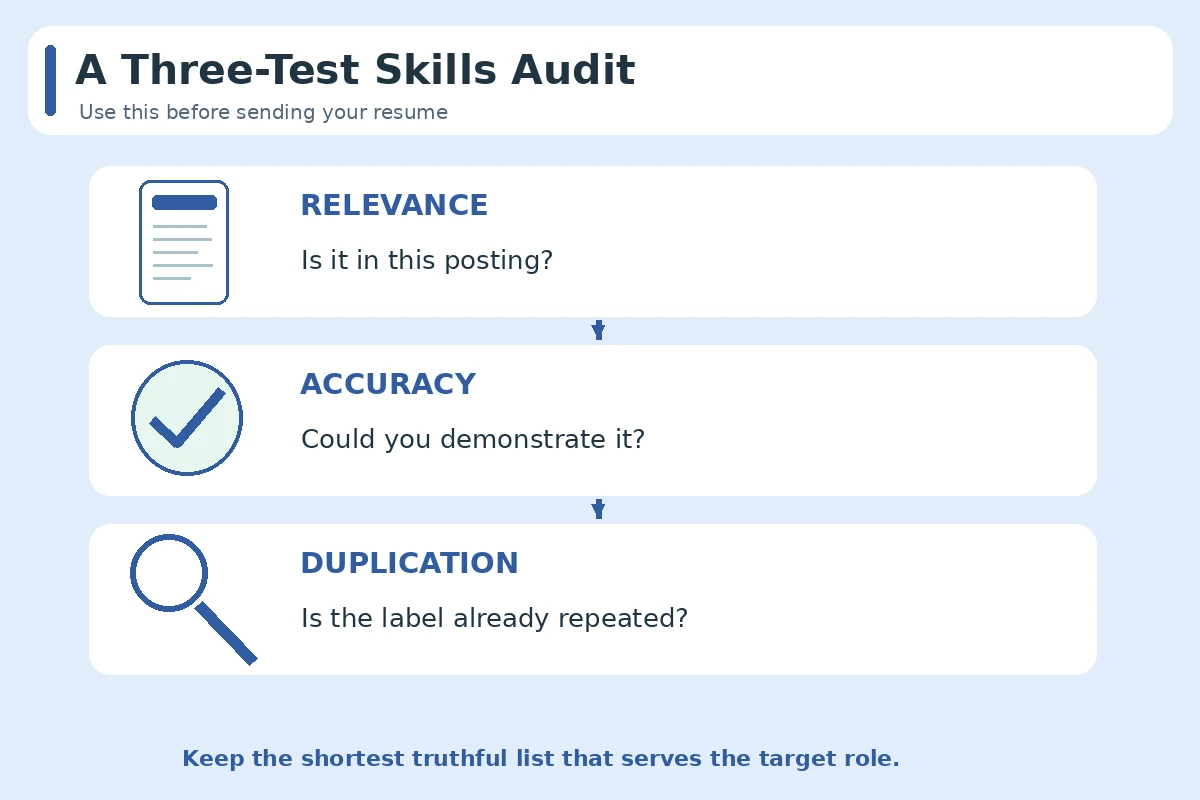
Run a final edit with three tests. First, relevance: remove any item that does not help explain fit for this vacancy. Second, accuracy: verify that you could describe each tool, procedure, or behavior. Third, duplication: avoid repeating the same skill phrase in multiple unlabeled lists when a single label and a useful experience bullet would suffice. Keep the original posting so you can compare your final version to the employer’s requirements. That disciplined check matters more than guessing an ideal number of bullets.
How We Research Resume Skills and Examples
We use public U.S. occupational descriptions, career-service guidance and documented competency frameworks to distinguish typical duties from individual qualifications. Links were checked on October 27, 2026. All sample resume sentences here are hypothetical writing examples, not claims about real applicants or JobAsk clients. Our review of public search results and the supplied local topic index does not reveal private WordPress drafts or establish availability of a slug in the database.
Source: CareerOneStop. CareerOneStop guidance recommending clear, standard resume section headings.
Source: CareerOneStop. CareerOneStop guidance on resume approaches and matching content to jobs.
Source: NACE. Competency definitions that help distinguish skills from unsupported personal labels.
These editorial references are informational, not a claim of endorsement or a commercial partnership. See the JobAsk affiliate disclosure. Skill examples must be adapted only to work you actually performed; no particular resume layout guarantees hiring or automated screening results.
More Resume and Cover Letter Guides
- Resume Contact Section: Format Your Name, Phone, Email, and Portfolio Links
- Administrative Assistant Resume Skills: Calendars, Records, and Scope
- Retail Resume Skills: Show Register, Stock, and Service Evidence
- Reverse-Chronological Resume Format: Put Your Work History in Order
- Resume Accomplishments Section: Select Outcomes You Can Actually Prove
Place it where the most relevant verified qualifications are easiest to find, taking the rest of your experience and projects into account.
No universal rule applies, but a plain single-flow text layout is easier to inspect and test than a complex graphic.
Yes. Group them when the labels help readers find distinct capabilities, and keep the subheadings recognizable.
Do not imply proficiency you have not attained. Describe completed coursework or projects accurately where relevant.
Text labels and concrete task descriptions usually communicate more clearly than unexplained personal rating bars.