
Call center job application online: To apply for a call center job online, first identify whether the posting describes inbound customer service, outbound sales, or technical troubleshooting. Then use its actual requirements to fill in your work history, customer-contact examples, software familiarity and schedule availability. Expect the employer to set its own assessments and submission rules; do not claim call volumes, sales targets, or systems you have never used. The workflow below helps an applicant with or without formal call center experience avoid mismatched claims.
Identify the actual type of phone-based role
A title such as “call center associate” does not tell you enough. Read the task verbs. Answering billing questions, recording complaints and referring unresolved issues points toward customer service. Prospecting and discussing products may indicate sales. Diagnosing accounts, networks or devices may belong to technical support and require different training. O*NET describes customer service representatives as providing information, keeping interaction records and escalating some unresolved matters; it separately excludes jobs whose primary function is technical support.
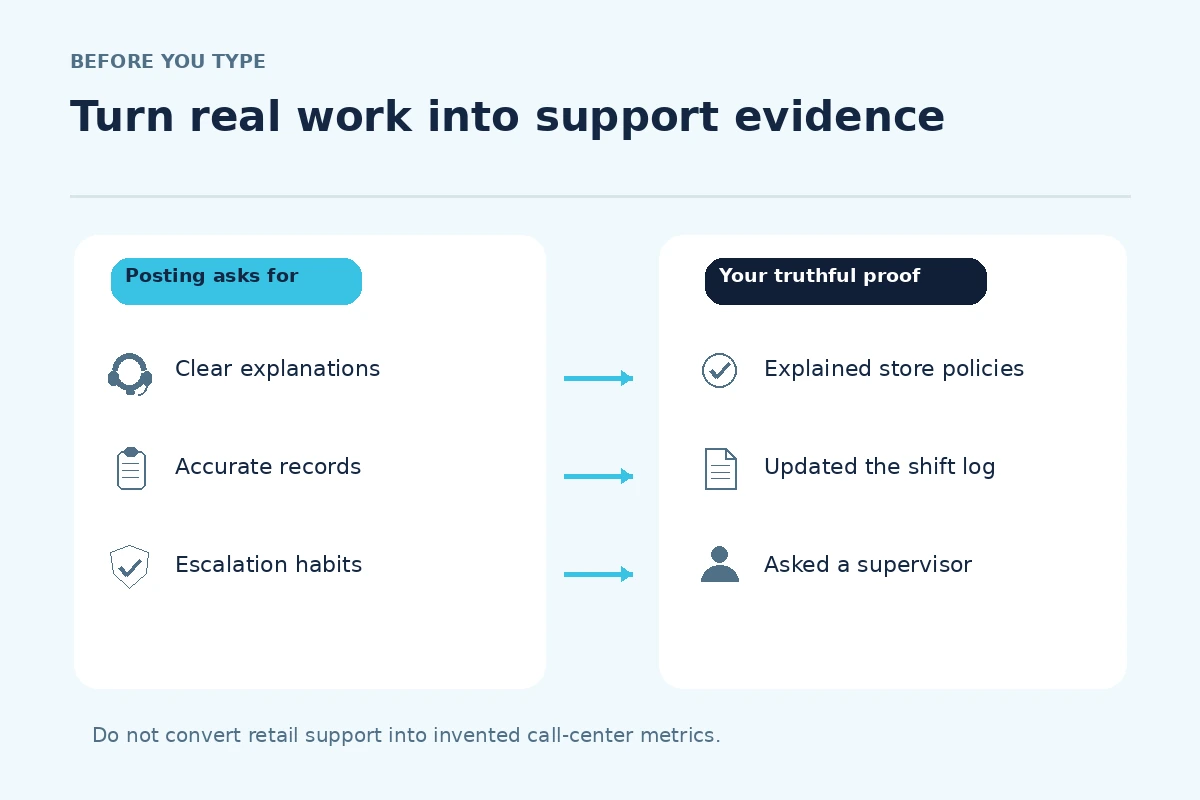
Make a simple two-column note before starting the form: what the employer wants, and what you can demonstrate. For an inbound role, useful proof may involve accurate notes, calm communication or a documented handoff. For outbound sales, describe outreach only if you actually did it. For technical troubleshooting, identify the systems you used and the point where a specialist took over. The role description, not an attractive generic job title, determines the evidence you choose.
Translate transferable experience into application fields
If you have worked at a front desk, in retail, in a library or at a campus help desk, you may have relevant examples without telephone metrics. The evidence should state the real setting, task and action. A hypothetical applicant might write: “Logged customer questions in the shift notebook and referred unresolved billing issues to a supervisor.” That example is usable only if the applicant truly did those things; the precise tool and reporting line should reflect their experience.
Do not turn “helped shoppers” into “managed a high-volume contact center” or turn a school software assignment into paid CRM administration. For a skills field, list only applications you have actually used; a customer-support ticketing platform is not interchangeable with a spreadsheet. If the form provides a free-text field, add a narrow sentence about your documented workflow. When there is only a dropdown, select the nearest truthful category and clarify later if a note field is available.

Prepare for screening without gaming the tests
Employers may use a typing exercise, a recorded response, a customer scenario, a listening test, or no test at all. Do not infer the test solely from internet stories. Read the invitation and identify what it asks, whether equipment is required, and when the session closes. If accessibility arrangements are needed, use the employer’s official accommodation channel rather than guessing about its procedure. A test link should be traceable to an application you knowingly submitted.
Practice one realistic response structure: confirm the issue, ask only for information needed under the stated policy, explain the next available step, and escalate when authority runs out. For example, if a customer disputes an account charge, an entry-level representative should not promise a refund unless the employer’s policy grants that authority. Accurate notes and appropriate escalation are more credible than exaggerated guarantees. Never use customer records or recordings from a previous employer as practice material.
Report schedules and work setup precisely
Online forms sometimes ask separately about evenings, weekends, remote work, work locations and shift changes. Read each question as written. If you can work weekends but not late nights, do not mark every shift as available to appear flexible. If a role involves customer calls from home, check whether the employer specifies a quiet workspace, network connection or employer-provided equipment; do not buy expensive gear because an unverified recruiter demands it.
Separate a preferred schedule from an actual restriction. If the form requires a single availability answer, use an accompanying comment box to explain what is conditional. Record time zones if shifts cross regions. For onsite positions, verify the actual worksite rather than treating a company’s corporate location as your commute. This prevents a strong application from becoming misleading at the scheduling stage.
Handle questions about privacy and authority
A customer service job may involve sensitive billing or account information. Applicants should highlight relevant confidentiality habits without displaying real data. A legitimate example could describe using an approved verification checklist, never copying account details into personal notes, and passing exceptions to authorized coworkers. Avoid claims that you personally authorized charges, waived fees or accessed restricted systems unless those actions were in your real role and permitted.
If an application asks for a full Social Security number, banking details or an immediate payment on a link sent by a supposed recruiter, stop and verify the employer through an independently located official careers page. The FTC warns that scammers use fake recruiting messages to obtain money and personal information. An employer’s verified process may collect certain information later in onboarding, but an unsolicited link is not proof of legitimacy.
Check the final form and keep a record
Before sending, compare the position title, employer, worksite, dates, references and uploaded resume against the actual posting. Open the attached file after upload if the portal permits a preview. Look for parsed job titles that changed, missing months in employment dates and a contact email containing a typo. Submit only after the required certification or acknowledgement text has been read and answered accurately.
Save the submission confirmation or application number if the portal issues one. Your own log might include the role, official posting URL, channel, date, assessment deadline and next action. A successful button click without a confirmation does not prove that the employer received a complete application. If something seems missing, review the account history before sending a duplicate.

Use a small example to audit your claims
Imagine a candidate applying for an inbound service role after a year on a retail returns desk. They can legitimately show that they listened to concerns, checked receipts under store policy and documented escalations. They should not write that they resolved network outages, managed telephone queue software or issued refunds beyond authority. The application can be strong because the example answers a real operational requirement with bounded evidence.
A useful final comparison is: posting duty “document complaints”; actual evidence “entered each unresolved return in the approved store log”; truthful application “recorded customer concerns and routed exceptions to the supervisor.” This is not a promise of selection. It is a way to avoid a preventable mismatch between the role, the form and your future interview answers.
How We Research Online Job Applications
We checked official employer, U.S. government and occupation reference materials on November 4, 2026, and compared these steps with the specific application intent. O*NET: Customer Service Representatives (Official O*NET description of customer-service calls, records, referrals and task boundaries). CareerOneStop: Job Applications (U.S. Department of Labor CareerOneStop guidance on accurate forms and saving online entries). FTC: Job Scams (Federal Trade Commission job-fraud warning signs and verification steps). General role descriptions are context, not proof that a particular job is open or that an employer will hire you.
The examples and visual worksheets on this page are hypothetical and should be adapted only to facts you can verify. Employers may change their portals, assessment stages and role requirements; revisit their current official pages before applying. JobAsk explains its editorial and commercial practices in the affiliate disclosure. No paid placement, hiring outcome or affiliate relationship is claimed here.
Related Job Search Guides
Not for every opening. Compare the required experience with customer service, documentation and communication you can prove from other work, school or volunteering. Do not claim professional call handling if you have not done it.
No. If you observed a demonstration, describe that accurately only if it is relevant. Hands-on use, training and observation are different levels of familiarity and should not be presented as the same qualification.
No. A screening invitation is only one step in a particular employer’s process. Follow its instructions, verify the sender and wait for explicit employer communication rather than assuming an offer.
Do not share identifiable customer records or confidential transcripts. Reconstruct a clearly hypothetical scenario or explain your process in general language without revealing private information.
Recheck the required troubleshooting scope and tools. Ordinary customer-service examples may still show communication skill, but do not imply technical diagnosis or access rights you do not possess.