
A career change from customer service to IT help desk can build on listening, ticket notes, calm user communication and effective escalation, but it also requires genuine technical troubleshooting ability. A customer-service representative who documents delivery complaints has support experience, not automatically computer user support experience. Start by comparing job descriptions for service desk, help desk analyst and computer user support specialist roles. Keep your work history truthful, demonstrate technical skills in an authorized practice environment, and never imply that experience with a CRM gives you administrator privileges.
Recognize the Overlap Without Pretending It Is IT
O*NET distinguishes customer-service representatives who answer questions and record account interactions from computer user support specialists who help diagnose equipment, operating system and software problems. The first profession provides transferable intake and communication habits. The second may require technical reproduction, account-security procedures, approved troubleshooting tools and specialized handoffs. Your strongest application explains where the work overlaps and where you built the new skill. The distinction protects both your credibility and the users of a technical system.
A simple evidence map contains three boxes: “already performed at work,” “performed in a practice lab,” and “not yet authorized or learned.” Place listening to a frustrated customer in the first box if that is real. Place reinstalling software on your own computer in the second only if you did it. Place resetting a corporate employee account in the third if you have no such authority. Avoid moving a task into a stronger category just because a prospective employer uses an appealing title.
Rewrite Customer Tickets With Accurate Verbs
Good IT tickets explain the issue, environment, observable behavior, reproduction steps, action tried, result and next owner. Customer-service records often capture issue categories, conversations and resolution dates but not software diagnostics. Describe your current work as “documented customer inquiries in CRM and escalated unresolved cases according to policy” if that is what happened. Do not automatically rewrite it as “diagnosed system failures” because you used a screen or had to solve an unhappy customer’s problem.
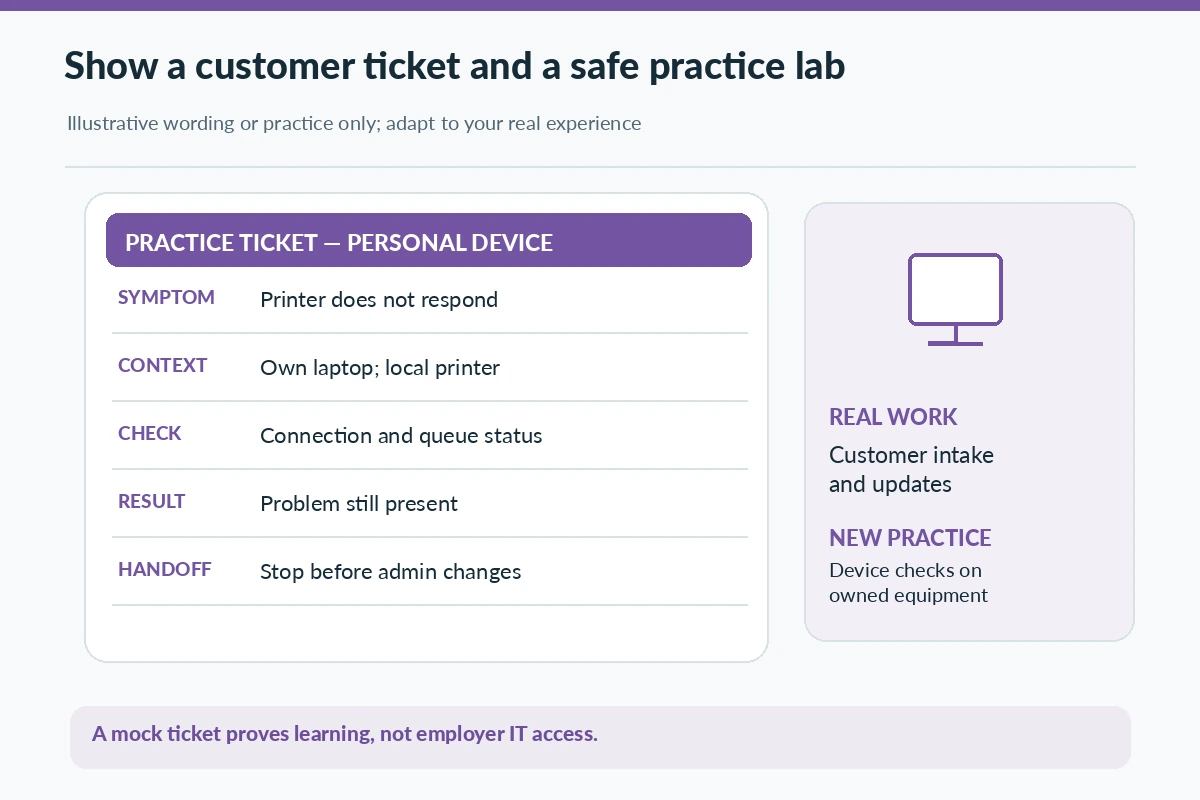
To prepare for a technical interview, create a synthetic example: a fictional user cannot print a document. Record whether the issue affects one application or all prints, whether a printer is reachable, and what safe checks could be performed with permission. State that an administrator or authorized technician would handle driver installation or policy changes when required. An interview answer can show your reasoning while remaining clear that the exercise was a lab and not a live corporate incident.

Choose a First Technical Skill to Demonstrate
Pick skills that match the target postings: operating system navigation, basic network concepts, printer troubleshooting, user-facing software questions or structured incident notes. Learn the difference between a symptom and its cause. For example, “cannot open a shared folder” may reflect permissions rather than a broken network. Your first step is to gather information and verify access using approved means, not bypass controls or improvise a password reset. Practice documenting each check and its observed result.
A small personal lab can include your own laptop, a virtual machine, a printer you own or simulated tickets. Make a one-page troubleshooting note with a date, configuration, steps, result and what remained unresolved. You should not install tools on an employer device, examine another person’s account, or probe a workplace network without explicit authorization. Practice is helpful proof of learning, but a lab is not professional IT employment. Label it under Projects or Technical Training rather than Work Experience.
Separate Ticket Routing From Technical Fixes
Many entry-level support roles emphasize identifying the appropriate next person or team as much as resolving everything independently. A ticket may go to hardware support, an application owner, a security team, or a manager. Record why you selected the destination and what details you included to prevent the user from repeating the entire story. A strong handoff describes symptoms and prior checks while avoiding unsupported diagnoses or sensitive secrets in ticket comments.
For example, after confirming a known user is having trouble signing in, you may follow the employer’s approved identity-verification procedure. That does not mean you can inspect private files, disable multi-factor authentication or grant access. Technical role scope is set by written process and authorization, not by what a person knows how to attempt. A career changer should treat those limits as part of professional competence from the first interview onward.
Build a Mini Knowledge-Base Article
Use a device or software configuration you own to write a short explanation for non-technical users. It might cover checking printer connection, reviewing a simple application setting, or restarting a local program with no unsaved work. Include prerequisites, a safe sequence, signs that the procedure did not work, and a note about when to escalate. Have someone read it for clarity without requiring access to their personal data or account. This demonstrates documentation and communication skills.
Describe the outcome of the exercise honestly. “Created a practice troubleshooting article for a personal printer setup and tested the instructions on my own equipment” is accurate if true. “Implemented company-wide IT knowledge base” would be false without real work evidence. What hiring managers may value is your ability to ask a good question, follow a reliable sequence, separate what you observed from what you assume, and stop when a task requires privileges you do not have.
Prepare an Interview Answer With Two Kinds of Proof
A reliable transition story has one customer-service example and one technical learning example. For the first, choose a real difficult conversation and explain how you recorded the problem, updated the customer and escalated. For the second, choose your practice lab and describe a test that failed, how you narrowed the problem and how you documented the result. This makes your transferable ability and developing ability visible without conflating them. Never invent certification, professional ticket volume or resolved-incident statistics.
You can also use a contrast statement: “In my customer-service role I was responsible for accurate intake and follow-up; in my own practice environment I learned basic operating-system and printer checks.” It communicates initiative but does not imply access to production servers or employer networks. If you are studying for a certification, state the actual status and do not list it as earned. Be ready to explain one mistake you found while learning and what source you used to verify the correction.
Compare Help Desk Roles Before Paying for Training
Different employers call their roles help desk, service desk, desktop support or technical support. Read the work context: password and account requests, software installation, device deployment, call queues, identity verification, documentation or on-call shifts. Some listings require formal education or experience; others provide supervised onboarding. Do not infer that every advertised entry-level position accepts the same qualifications. A course is worth considering only when you can connect its exercises to the gaps shown in real postings.
Review three official postings and mark a specific learning target for each repeated technical requirement. Choose one safe lab that proves part of a requirement, document it and ask a knowledgeable person to review your explanation when appropriate. Avoid claims that a named certification guarantees a role. The interview process may include technical questions or practical troubleshooting, so repeatable knowledge matters more than collecting badges that you cannot demonstrate. Keep personal projects segregated from employer systems and accounts.
Protect Your Identity and Systems During the Search
Recruiter impersonation is a practical risk when searching for remote help desk roles. The FTC warns about fake hiring messages that request money or early financial information. Verify the opening on an employer-controlled careers page, and do not install remote-control applications or share credentials at the request of an unknown recruiter. Be cautious about a “skills assessment” that asks for administrator access to your personal device or pushes you to handle third-party accounts. A test should have an identifiable employer and sensible boundaries.
Keep an application tracker with the official posting, your submitted resume version, training claim and contact channel. Avoid sharing confidential customer-support tickets in a portfolio. Build mock tickets with invented people and devices instead. A safer transition gives prospective employers concrete evidence of documentation and learning while showing that you respect data access, authorization and privacy. A genuine role will still need careful evaluation of duties, hours, training and the team’s escalation rules.

Pick a Realistic First Month of Preparation
Use a measurable but modest plan rather than an unverified promise to become an IT professional overnight. In week one, compare postings and identify two common troubleshooting tasks. In week two, complete one practice ticket from start to finish using your own device. In week three, create a short knowledge-base page and seek feedback on its clarity. In week four, revise your resume to separate paid customer-support evidence from lab training and apply only to roles that match the demonstrated skill level.
You may discover that a customer-facing technical support role is a closer entry point than a specialized systems position; that is a normal research finding, not a failure. Your final evidence table should clearly separate a skill already used in real service work, a technical task rehearsed with consent and a privileged task reserved for trained employees. That distinction prevents application exaggeration and gives you concrete questions for interviews and future supervised learning.
| Customer-support skill | IT help-desk overlap | Missing proof | Boundary |
|---|---|---|---|
| Issue intake | Ticket details and priority | Basic device and OS checks | No admin privileges |
| Customer updates | User status communication | Technical reproduction steps | No unsupported fix |
| Escalation | Route technical incidents | Knowledge-base practice | No security bypass |
How We Research and Verify Career Transitions
We compared the documented task descriptions for the starting and destination occupations, rather than assuming that similar job titles grant the same authority. The examples are fictional templates that readers must adapt to work they genuinely performed; they are not verified applicant outcomes, promises of employment, or licensing advice. Sources reviewed on 2026-11-05. Job requirements and permissions vary by employer, position and location. Read our affiliate disclosure for the site policy.
Source basis: O*NET occupational profile — Customer service representatives answer questions, record interactions and route unresolved concerns.; O*NET occupational profile — Computer user support specialists help users diagnose and resolve computer, software or peripheral problems.; FTC job-search safety advice — FTC warns against job offers that ask for fees or sensitive information before verification.. Review the actual vacancy and any credential rules before making a final career decision.
Explore Related Career Guides
They can help with intake, communication and ticket history, but most IT help-desk roles also require role-specific technical knowledge and troubleshooting practices.
Call it customer-service ticket or CRM experience unless you actually supported hardware, software or IT users. Explain precisely what the tickets concerned.
A small, clearly labeled practice environment can demonstrate device setup, user-facing troubleshooting and documentation without accessing an employer system.
No universal requirement applies to every IT help-desk role. Read the specific posting and match the listed training and experience before investing.
Not without authorization and an approved procedure. Use your own accounts or synthetic practice environment for demonstrations.