
A graphic designer moving into digital interface design can carry over typography, visual hierarchy, color, composition and experience responding to feedback. The missing work is often interaction: how a person navigates a page, understands a form, sees an error, uses a small screen or completes a task with assistive technology. A polished static mockup is useful evidence of visual craft, but it is not proof that you tested or shipped a usable interface.
BLS distinguishes graphic designers’ work on visual concepts and layouts from web and digital interface designers’ focus on website and application interfaces. This article shows how to audit your portfolio and develop one carefully scoped interface case study. It does not assume a formal UX credential is universally required or promise that a visual redesign alone qualifies you for every product-design role.
Identify What Visual Design Already Proves
Start with actual work you own or are permitted to share: a brochure, brand system, editorial page or digital campaign. Write one line about its audience, constraints and revision process. Those artifacts demonstrate layout and communication choices. Now compare an interface design posting: it may ask for user flows, states, responsive behavior, accessibility review and coordination with developers. Mark these as separate competencies until you can show that you practiced them.
A portfolio case study should not convert a print campaign into an application project by renaming the file. Instead describe what you designed and how it might inform a new interface. For example, the hierarchy of a printed appointment guide may influence a digital scheduling page, but the interactive form, confirmation state and keyboard navigation still need new decisions. Do not claim the printed asset was usability-tested merely because someone liked it.
Build One Complete Interface Task, Not Ten Screens
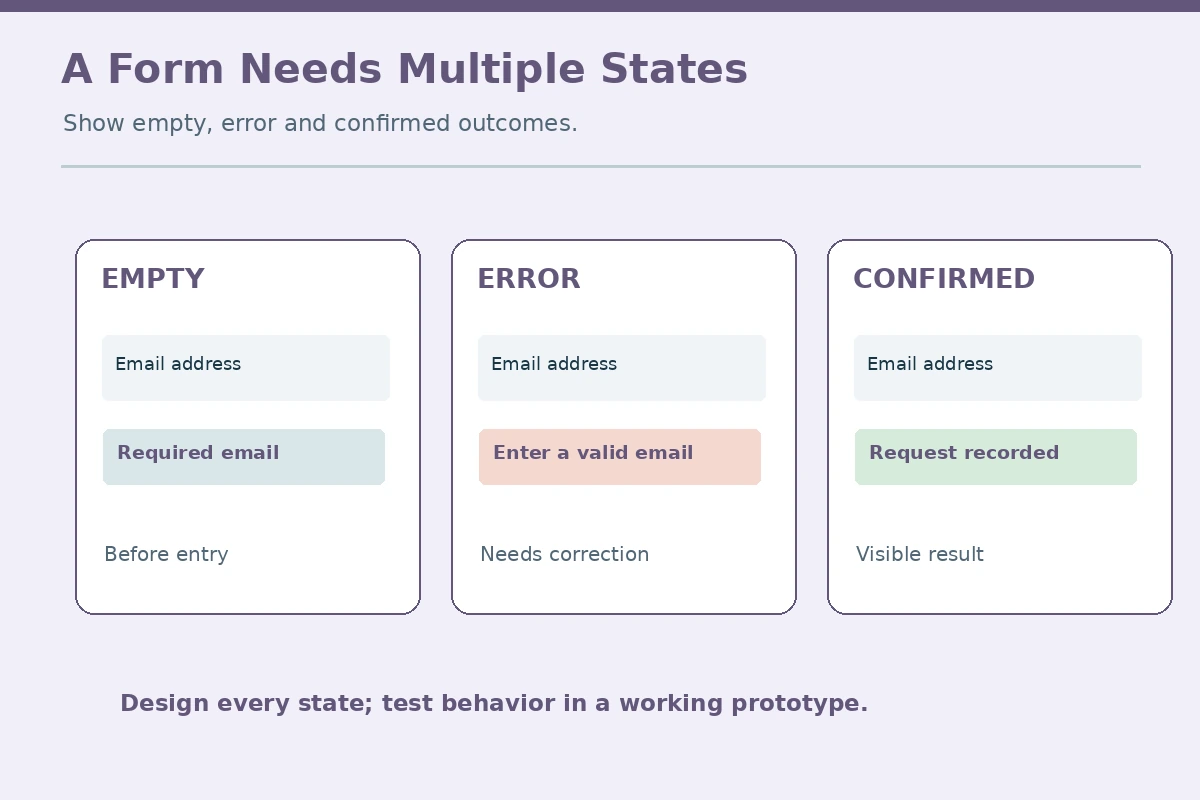
Pick a simple fictional task, such as requesting a library room reservation, selecting an event time or sending a contact form. Define the user’s goal and the information needed to complete it. Draw the default state, the input state, the validation-error state and the confirmation state. Include small-screen behavior rather than assuming every viewer has a wide monitor. A plausible interface shows what happens when a field is empty, a request fails or a label is unclear.
A helpful case study describes why a decision changed. Perhaps your first form placed instructions only in faint placeholder text; then you moved them into visible labels and added an explicit error message. Label this as a design iteration. Without real user research, do not claim that the change increased completion rates or satisfied all accessibility requirements. If you conduct testing, explain who participated and what you actually observed, without inventing a sample size.
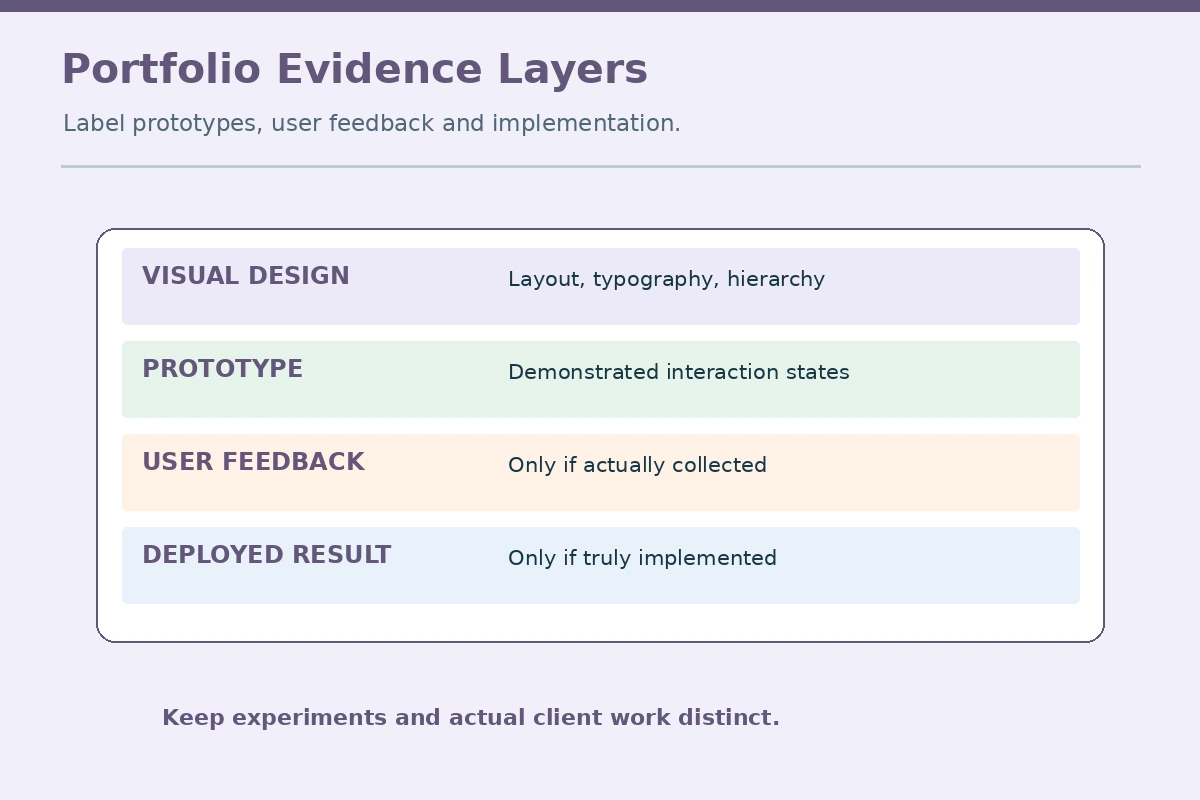
| Graphic design evidence | Interface design extension | Do not imply |
|---|---|---|
| Visual hierarchy | Task-focused page layout | Tested user flow |
| Typography choices | Readable labels and errors | Accessibility certification |
| Client feedback cycles | Interaction-state revision | Production deployment |
| Static portfolio asset | Clickable demo with limits | Real customer adoption |

Separate Accessibility Checks From Certification
Digital interfaces must be understandable and operable for different users. Read current accessibility guidance from credible sources and learn about contrast, semantic labels, focus order, keyboard access and clear errors. Some checks are visual; others require working prototypes and technical review. A color palette that looks attractive is not sufficient proof that a finished product meets a standard, and a screenshot cannot demonstrate keyboard navigation.
In a fictional project, use a checklist to mark contrast reviewed, visible field labels added, error text written, and keyboard behavior awaiting a functional implementation. That final open item is important. It shows you recognize what cannot be verified from a static design. Use accurate language such as “considered accessible label placement” rather than “WCAG certified” unless you have a defensible, appropriately scoped evaluation.
Document Handoffs Without Inventing Engineering Work
Employers may expect designers to explain component behavior to developers: what changes on hover or focus, how a button responds, whether content wraps and what to show when the system has no data. You can practice writing those design specifications for a demo interface. Do not present a Figma-style drawing as production code or claim you completed implementation testing when an engineer did that work.
If you worked with a developer previously, describe your own contribution accurately: supplied approved assets, responded to implementation questions, or reviewed visual differences. Do not expose customer source files or internal product roadmaps. A useful handoff sample can use invented component names, visible state labels and a note about assumptions. The reviewer should understand your decision-making without access to confidential employer material.
Audit Case Studies for Evidence and Rights
For each portfolio item, include the purpose, your role, the artifact, the feedback you received and what can be observed. Distinguish client-approved work, independently created exercises and collaborative projects. A client’s willingness to hire you for graphics does not necessarily grant public rights to share a private product concept. Confirm permission before posting screenshots, customer data or commissioned brand assets.
If you cannot publish original work, create a fictional interface using non-branded copy and clearly label it as speculative. Demonstrate the interaction flow without suggesting a real organization adopted it. Do not fabricate before-and-after business metrics. Hiring teams can learn from a well-explained decision log: which content was confusing, what alternative you explored and how you would test it with users.
Choose a Narrow First Role and Explain the Pivot
Search postings for digital interface designer, UI designer or junior product designer and read task requirements rather than assuming the names are equivalent. Some roles center on visual components; others need qualitative research, interaction prototypes or production collaboration. Compare your evidence with those demands. If the gap is substantial, focus on one portfolio project that completes a real workflow before enrolling in an expensive general program.
A credible career-change summary might be: “Graphic designer experienced in typography, layout and feedback cycles, building demonstrable interface flows and responsive design samples.” Keep the samples separate from employment history. Before submission, open your prototype at different widths, read every error label and test any interaction that genuinely exists. Do not state an outcome you did not measure, a tool you never used, or a role title you did not hold.
How We Research Career Transitions
On 2026-11-14, we reviewed official occupational guidance: BLS: Graphic Designers — BLS describes visual communication, layout, presenting concepts and incorporating feedback in graphic design.; BLS: Web Developers and Digital Designers — BLS distinguishes digital interface design and web-development responsibilities, including usability and functionality.. We checked the chosen transition against the supplied WordPress title exports and the available prior article packages. The sample job descriptions, resume bullets and visual exercises are illustrative, not actual open vacancies or proof of a hiring outcome. Your location, credentials, job duties and authorized scope may differ from the occupational summaries. Verify each vacancy and employer independently. Read the affiliate disclosure; no employer partnership or sponsored placement is claimed.
Explore Related Career Guides
Yes, typography, layout and visual communication transfer, but interaction, usability and accessibility work need separate evidence.
No. It can show a design proposal, not how real people complete tasks in an implemented product.
Yes, if clearly labeled as a personal or speculative project and built with materials you are allowed to use.
Only with appropriately scoped, defensible evaluation. Document what you checked and what remains untested.
Requirements vary by role. Compare actual postings and understand handoff, prototypes and technical constraints before deciding.