
Quick answer: Compare your original resume with every important value copied into the online form: contact information, employer, role, dates, education, and credentials. Correct the populated fields and recheck the final review screen before submitting.
This guide provides practical steps for US job seekers. Screens, account rules, deadlines, and accepted document types vary by employer and platform. All bracketed examples are hypothetical; they are not employer instructions or guarantees of an interview.
Treat Autofill as a Draft, Not as Verified Work History
A hiring portal may read your resume and populate fields such as employment dates, employer names, education and contact information. This is a convenience, not a final accuracy check. Indeed’s application help specifically asks applicants to review resume details after extraction and edit, delete or add information as needed. Other portals may parse fewer fields, require manual entry or display a preview that looks different from the original document.
Start from the version of your resume you actually intend to submit. Put it beside the web form and compare each significant field. Never assume that a familiar company name, neat formatting or a visible upload checkmark proves the underlying structured record is accurate. A recruiter may receive both the attached file and the answers exported from the application form, and those versions should not contradict each other without an honest explanation.
Check Identity and Contact Fields First
Verify your full name, email address, telephone number and location before doing a long employment-history review. A browser can autofill details saved for shopping, or a portal may reuse an old candidate profile. If a dated resume is attached, it may contain a previous telephone number. Correct the form to the current contact information that you are comfortable sharing with the verified employer.
Be deliberate with optional personal details. Do not treat the presence of a blank field as an instruction to disclose unnecessary sensitive identifiers. If a government or regulated hiring workflow legitimately requires additional information, use the verified employer’s instructions and secure portal. The FTC warns that fake recruiters sometimes imitate real hiring processes to collect personal or financial information; an autofill convenience should not override an independent trust check.

Compare Every Employment Entry in the Same Order
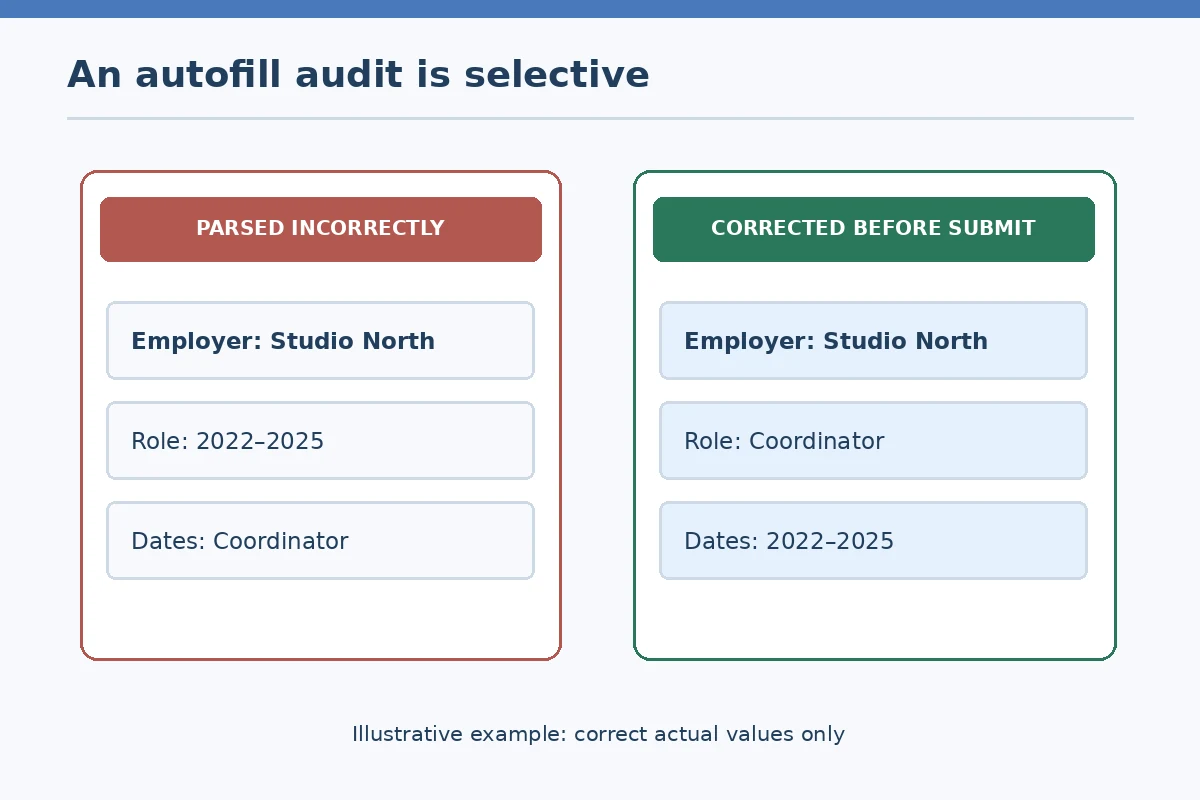
Resume parsers can misunderstand two-column layouts, tables or a header that combines dates and employers. Review the number of work entries, employer names, role titles, and the start/end month and year. If two jobs ran concurrently, preserve that overlap rather than allowing software to invent sequential dates. If you were a contractor, volunteer or intern, use the proper label and avoid upgrading the relationship to regular employment simply because the form suggests it.
Check whether the form allows a current role or requires an end date. A checkbox such as Currently Employed may change which fields are available. Do not enter the current date as the end of a role you still hold unless instructed. For positions held at the same employer, decide whether the portal allows separate promotion entries or a combined entry; whichever you choose, the chronology must stay factual and consistent with your attachments.
| Field type | Common mismatch | Verification |
|---|---|---|
| Employment dates | Dates shifted into adjacent job entries | Compare month/year against original resume |
| Job title and employer | Employer name appears as job title | Check original job header and field labels |
| Contact information | Older email or shortened phone number | Read current address and email aloud |
| Skill or degree | Keyword promoted into unsupported credential | Remove or correct the inaccurate value |
Repair Education Skills and Credentials Without Inflating Them
Autofill may move a course name into a degree field or treat a skill keyword as a certification. Compare the exact credential awarded, school or training provider, completion status and dates. If you are still studying, say in progress or give an expected date only when permitted and accurate. An employer may assess the form answers separately, so an uncorrected credential field is more than a cosmetic mistake.
For skills, distinguish exposure from proficiency and remove items pasted from an old generic resume if they do not reflect your current abilities. If the portal asks for an entire list, choose the skills you can discuss in an interview and use the employer’s categories when they match the truth. Do not insert the posting’s requirements into a qualifications section simply to make the parser look complete.

Inspect the Final Review Screen Separately From the File Preview
A readable resume upload does not guarantee the form has captured job history correctly. Review the actual application summary immediately before submitting. Look for wrong field mapping, stray punctuation, duplicated descriptions, gaps created by dropped jobs, and missing mandatory statements. If the portal has an Edit action, fix the source field and return to the review screen so you can verify that the correction persisted.
Indeed’s help describes review and submit stages after parsed resume details. USAJOBS follows another process that can include completing agency-specific steps after the initial package. Do not claim that one platform’s screen or file limit applies to all applications. Make a short list of your recurring parsing problems so you can choose a simpler resume layout or prepare manual entries next time rather than repeatedly discovering the same errors at the deadline.
Know What You Can and Cannot Fix After Submission
Changing a saved profile resume may affect later applications while leaving an already-submitted application unchanged. Indeed’s help makes this distinction for its own platform. Some employers let applicants edit a submitted form before a posting closes; others require a message to hiring support or do not permit changes. Read the specific account instructions before replacing files or sending a second application.
If you discover a factual error after submission, prioritize corrections that could change eligibility, identity, qualifications or contactability. Use the official correction route. A minor wording preference rarely justifies duplicate submissions, whereas a wrong license status or employment date may need prompt clarification. Keep the revised wording truthful and mention the requisition number if contacting the employer.
Create a Repeatable Three-Source Audit for Future Applications
Before each submission, compare three things: the original resume file, the populated online fields, and the final review summary. Start with contact information, then chronology and qualifications, then less consequential formatting. Save an appropriately named resume version on your own device so you can identify which document accompanied each application. Avoid storing passwords or confidential job-portal data in the same file.
Your goal is consistency, not making every system parse identically. A portal that requests manual employment history may repeat information already on the resume for its own workflow. Complete the required fields accurately rather than adding “see resume” where details are mandatory. Check the visible submission receipt, and record the submitted job and version without copying sensitive data into shared spreadsheets.
How We Research Online Applications and Portal Differences
We reviewed platform help pages and official consumer guidance on 2026-10-29, with particular attention to where platform-specific functions should not be generalized across all employers. Sources: Reference A (Indeed’s direct-apply help explains reviewing parsed resume details, submitting, status and email confirmation for applications made on Indeed.); Reference B (USAJOBS describes profile steps, reviewing materials, and continuing to the agency before final submission.); Reference C (Indeed documents that changing a profile resume does not necessarily edit an already-submitted application.); Reference D (The FTC recommends independently verifying an employer and avoiding suspect onboarding forms or payment requests.). Screens and policies may change; verify the current instructions on the real employer site before acting.
We separate examples from proven account states and avoid predicting hiring outcomes. We do not promote paid application shortcuts, ask for login credentials, or claim a particular portal will accept duplicate submissions. See the affiliate disclosure for site relationship information; this article does not assert an affiliate partnership.
Related Job Search Guides
- Online Job Application Won’t Submit: Find Errors Without Losing Your Work
- No Job Application Confirmation Email? Verify Receipt Before Reapplying
- How to Complete a Job Application PDF and Check It Before Sending
- How to Submit a Resume Through an Online Job Application Portal
- How to List References on a Job Application Without Mistakes
Treat it as a draft. Confirm job titles, employers, dates and current-role labels against your original resume before submitting.
The parser may have read a document header incorrectly. Edit the corresponding fields and verify the corrected review screen.
Not necessarily. A new profile file may only affect future applications; use that employer or platform’s correction instructions.
No universal layout works for every system, but clearly labeled text and straightforward sections can make manual review easier.
Only if they accurately describe abilities you possess and you can explain them with truthful examples.