
When you find the same opening on a job board and an employer’s career website, a saved bookmark is not evidence that the employer received your application. Keep one personal record for each real opening, but separate the place you discovered it from the system where you submitted it. Mark a submission as confirmed only when you have a credible completion screen, portal record, or receipt email. If all you have is a board label that you set manually, record that honestly and inspect the employer portal before clicking Apply again. This guide focuses on cross-platform proof, rather than another generic list of spreadsheet columns.
Map discovery and submission as separate events
Start with a hypothetical example: you discover a Logistics Assistant opening on a board, click Save, and later select Apply on Company Site. Those are three distinct events: discovery, intention, and transfer. None shows whether the employer’s final form was sent. Record the posting link under Discovery Source, and the company application URL under Submission Destination. If the company uses a separate application system, treat that system as the primary location for confirmation rather than assuming the board imports every update.
Use a unique reference for the opening whenever the employer displays one, such as a requisition number. A title alone can be misleading: two teams may use the same title, and a board may create multiple listings for one opening. For each record, add the employer, exact role, location or remote eligibility, and a canonical employer link if you have verified one. A single row may point to more than one discovery site without becoming two applications. Do not erase the discovery source; it can help you determine where an unexpected message originated.
Use an evidence ladder instead of guessing
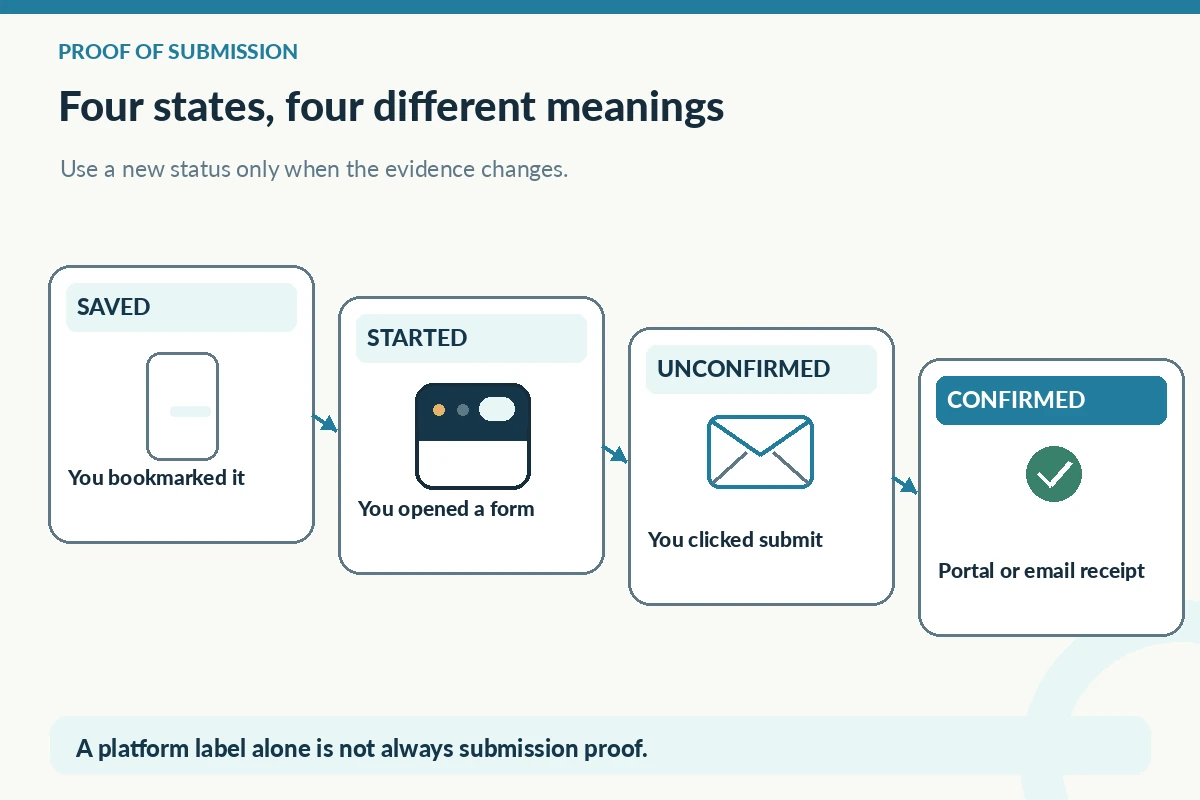
Consider four labels: Saved, Started, Submitted—unconfirmed, and Submitted—confirmed. Saved means you intended to return. Started means you began a form but have not proved completion. Submitted—unconfirmed means you believe the final button worked but lack an independent receipt. Submitted—confirmed means the employer portal, completion page, or email supplies a clear receipt. Interviewing and Closed are later stages supported by new messages. The point is not to create more statuses: it is to prevent the false leap from Saved or Started to Applied.
Indeed’s support documentation says that postings hosted on Indeed may move automatically to Applied, while external-site jobs can be moved manually. LinkedIn similarly describes different handling for applications completed on its own platform and those completed elsewhere. Therefore a platform label is useful context but not always direct proof. Copy the precise portal wording into a short note only when it matters, with the date you saw it. Never translate ‘under review’ into a promised interview or rejection.
Reconcile duplicate-looking records carefully
Before submitting from a second board, compare employer, requisition ID, title, location, and hiring team. When these match, check your inbox and employer portal for an earlier receipt. A duplicate board tile can be a re-advertisement, a scraped copy, or a separate opening; the listing itself does not decide which. If the records differ, preserve that distinction. Do not delete a genuine second application just because both roles share a title.
If you cannot verify whether a final submission succeeded, revisit the legitimate employer portal using your existing account. Inspect its application history and the confirmation email address you used. If still unclear, use the employer’s published support route; do not repeatedly submit new copies simply to force a receipt. Keep any troubleshooting note factual: ‘No receipt visible after form; portal checked Tuesday,’ not ’employer lost my application.’

Make one row a verifiable application record
A concise sample is: Employer: North Harbor Logistics (fictional); Role: Logistics Assistant; Requisition: LAB-204 (fictional); Found on: Board A; Submitted at: Employer career portal; Evidence: confirmation email received; Date submitted: April 8 (illustrative); Next step: review employer’s stated timeline. Notice that the tracking row does not contain a password, identity document, or invented contact. The reference is a fabricated teaching example, not a real job or proof of employment.
Keep links to files in a private folder under your own control. The folder may contain a tailored resume, the original posting for interview preparation, and a receipt or email subject line, but avoid unnecessarily copying personal data from the form. If you later discover the posting was suspicious, record a warning and verify the employer independently. The FTC warns that impersonators can use credible-looking recruiter messages to collect sensitive information.
| Signal | What it proves | What it does not prove |
|---|---|---|
| Saved on a board | You bookmarked the listing | You sent a form |
| Applied (manual stage) | You organized the board item | The employer received it |
| Employer receipt | The system recorded a submission | A recruiter reviewed it |
| Interview invitation | Someone invited you to a step | You have an offer |
Review sources of truth once a week
Sort the log for Saved and Started rows first: these are opportunities that may still require action. Then review Submitted—unconfirmed rows against the employer’s portal, not against a decorative progress badge. Finally, inspect submitted records with upcoming response or interview dates. A weekly review is a planning habit, not a claim that every employer responds on a fixed timetable. Update a status when new evidence arrives, and retain the old event date in notes if it may matter later.
When a board removes a saved job, that does not prove an employer rejected you. Indeed says saved listings may disappear when an employer removes a job, and board histories may have limits. A missing listing is a signal to check the official portal or stored receipt, not a hiring decision. The method also avoids another trap: if a recruiter sends a link to an unfamiliar copy of the job, verify the employer’s official career site independently before supplying information.

Choose the next action without duplicate outreach
Write an action that can actually be completed: ‘Check company portal for receipt,’ ‘Save confirmation email,’ or ‘Prepare for scheduled interview.’ Avoid vague items such as ‘get hired’ or ‘make company reply.’ If the posting names a timeline, note it accurately. Otherwise set a personal review reminder rather than pretending the employer owes you a response by a certain date. Tracking must help you decide what you control.
An optional read-only dashboard can group applications by evidence level, but it should not show a false probability of success. Never count bookmarks as applications sent. For a month-end review, report separate counts for saved openings, attempted submissions and confirmed submissions. If two board listings led to one official form, count one submitted application, with two discovery links. That simple rule makes the tracking data substantially more trustworthy.
How We Research Application Tracking Advice
We compared the specific, publicly available guidance linked here: primary career resource additional source platform or career guidance verification guidance. We treat tracker fields and file organization as practical planning methods, not employer obligations or guarantees of hiring outcomes. Sample employers, requisitions and dates in this article are explicitly hypothetical and are not real vacancies. Recheck platform instructions because interfaces can change. See our affiliate disclosure; this article does not claim sponsorship or an approved referral relationship.
Related Job Search Guides
No. Saving or bookmarking records interest. Check the actual submission route and look for a completion record before logging the application as confirmed.
Write down exactly what each system shows and verify the employer account and confirmation email you used. Do not infer a rejection or send duplicate applications without checking.
Yes. Keep discovery sources together when the employer, requisition, and other details clearly identify one opening. Distinguish genuinely separate requisitions.
No. Keep access credentials in an appropriate secure password manager, not in a spreadsheet or a shared job-search log.
Count confirmed, distinct employer submissions separately from bookmarks and partial forms. This makes your own history useful without promising an employer response.