
A two-page resume is reasonable when you have enough relevant achievements, technical work or professional history to justify the space. It is not automatically better for senior candidates or worse for everyone else. Begin with the strongest evidence on page one and let page two earn its place. A second page filled with weak tasks, repetitive skills or outdated details makes the reader work harder without learning more.
CareerOneStop discusses a one- or two-page range, while the University of Pennsylvania career-center guidance recommends one page for most undergraduate and recent-graduate resumes and allows longer documents when qualifications warrant them. The answer depends on your experience, target role and employer instructions. Use the editorial checks here before expanding the document.
Apply a Page-Two Admission Test
List every section you want to keep and rate each item: is it directly required by the vacancy, strong supporting evidence, or merely interesting background? Page two should contain material that improves a reader’s understanding of your readiness—not words that repeat page one. If the first page already shows the essential tools, responsibilities and qualifications, remove weaker details before adding pages.
A technical worker may have multiple substantive projects; a person with several relevant positions may need space to show progression. By contrast, stretching a first-job resume to two pages with unrelated school activities usually buries the few strong examples. Treat page count as the result of a content decision, not the main objective.

Put Essential Qualifications on the First Page
Your name and contact information need to be easy to find. Follow with the recent or most relevant evidence, recognizable section headings and top accomplishments. If an employer specifically requires licensure, certain coursework or tools, show verified qualifications prominently. Do not make the reader wait until page two to determine whether you meet a stated requirement.
Order supporting bullets by relevance. A role that involves reporting may be better served by a recent validation project than by a much older generic customer-service task. Chronology within an experience section can still be accurate while a separate Relevant Projects section highlights a strong earlier example. Do not alter job dates to make a preferred item look recent.
Avoid Awkward Page Breaks and Empty Space
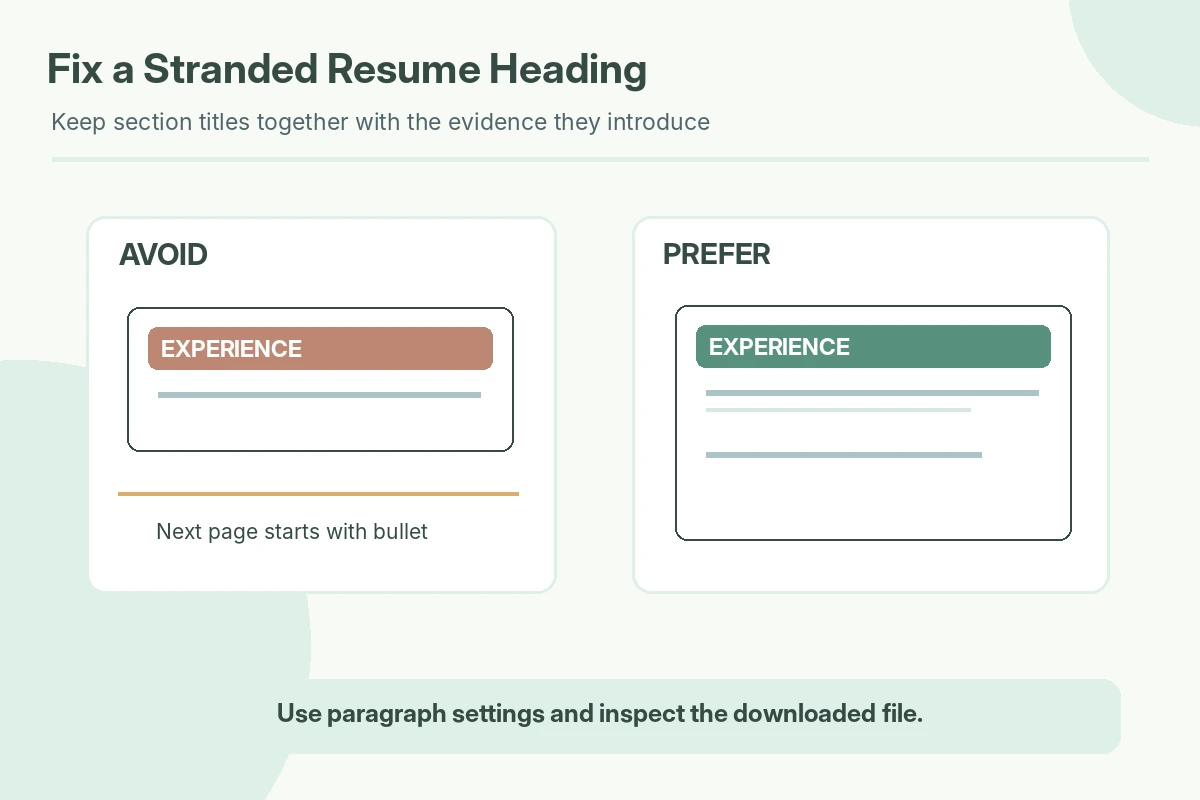
A heading at the bottom of page one with its first bullet on page two is harder to read than a complete group. Use your document editor’s paragraph settings to keep the heading with the next paragraph when appropriate. Avoid slicing a short project description between pages or making the second page mostly blank. Keep margins, font choices and bullet indents consistent across both pages.
If page two contains only a couple of short lines, try condensing repeated duties and tightening unnecessary spacing rather than shrinking text below a comfortable reading size. Never solve overflow by hiding text or compressing everything into narrow columns. Test the actual exported file, not only the editing view.
Make the Second Page Self-Explanatory
For a two-page document, a simple name or page marker at the top of the second page may help if printed pages become separated. Some university guidelines recommend this convention. At the same time, important qualifications and contact information should remain available in ordinary body text, because some application systems may not interpret headers consistently.
Keep section naming coherent: if Professional Experience continues, use consistent formatting rather than abruptly switching fonts or date styles. A reader scanning page two should know whether it contains earlier employment, selected projects, publications or supplementary credentials. Do not repeat your whole summary or start an unrelated second resume.
Decide What to Condense or Remove
Cut generic bullets first: “worked with a team” or “responsible for daily duties” provides little information without scope. Retain statements about concrete, verifiable work. Shorten old experience to a role and one relevant bullet if needed; remove outdated tools that are no longer pertinent. Keep certifications only when true, current and relevant, and avoid listing half-completed courses as completed qualifications.
A hypothetical before-and-after revision illustrates the tradeoff. Before: “Performed a wide variety of administrative duties to ensure a smooth office.” After, if true: “Maintained the weekly appointment calendar and flagged scheduling conflicts to the office lead.” The improved version conveys the work without an invented improvement percentage. It may be shorter and more credible.

Inspect Both Pages After Export
Export according to the employer’s instructions. Open the PDF or document at standard zoom and check readability, page breaks, missing symbols, and whether contact information sits in extractable text. Select a few lines to see whether the reading order is intelligible. If a portal requires DOCX instead of PDF, use the requested type. There is no universal rule that one extension always parses better.
Perform a final relevance test: remove page two temporarily. If your qualifications become meaningfully less clear, page two probably has a job. If the reader learns almost nothing new, condense back toward a page. The result should be the clearest truthful presentation, not proof of an ideal page count. Test an actual print preview too: a document can show different spacing after export or printing, particularly near page boundaries. If changing devices alters a paragraph position, adjust the break and inspect the resulting file once more. A clean second page should remain useful in both digital and printed views.
How We Research and Check Resume Guidance
Our guidance is grounded in these original occupational and product-help sources: CareerOneStop university career guidance CareerOneStop university career guidance. Pages were checked on October 26, 2026. We also compared current public search results and available JobAsk archive topics to keep this article focused on a distinct layout decision. The hypothetical examples show how to express work truthfully; they are not actual applicant records or measured hiring outcomes.
No universal hiring-system compatibility, employer preference, job offer or third-party editorial endorsement is promised. Resume formats and application instructions vary. No affiliate relationship is implied. Read the affiliate disclosure for site policy.
More Resume and Cover Letter Guides
- One-Page Resume Template: Decide What Deserves the Space
- Combination Resume Format: Show Skills Without Hiding Work Dates
- Two-Page Resume Format: When Extra Space Makes Your Case Stronger
- Reverse-Chronological Resume Format: Put Your Work History in Order
- Functional Resume Format: Show Skills Without Hiding Your Work History
No. Two pages can be appropriate when there is enough relevant experience to support them.
Often one page is enough; check any career-center or employer guidance that applies.
It can, but keep headings and key details together when possible.
No. Remove repetition before sacrificing legibility.
No. Choose a length that presents the strongest relevant evidence without unnecessary filler.