
A resume contact section has one essential job: allow an employer to identify you and reach you. At the top of a US-focused resume, use a clear name, a reliable phone number and a professional email address. Add a city or region when relevant, and include a working portfolio or LinkedIn link only when it helps the specific application. Do not turn this small section into a biography. The UC Davis Career Center identifies name, city/state, phone and email as its baseline contact fields and treats professional links as optional.
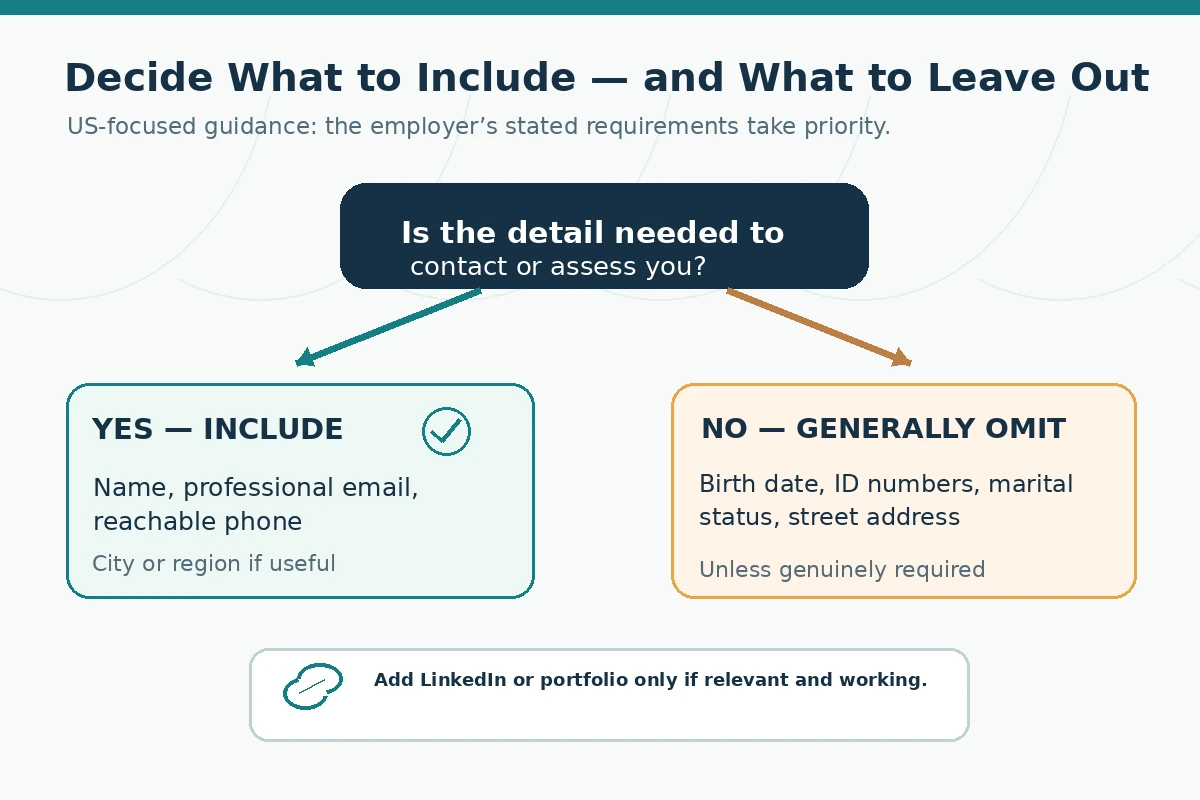
This guide is about the content, privacy decisions, and usability testing of that header—not the typeface and page margins discussed in other JobAsk resume-format articles. You will find a hypothetical annotated example, an include-or-omit decision tree, and a three-step contactability test. Employer-specific forms and international conventions may differ, so always read the real posting.
Put Your Name and Reachable Details First
Write the name you want the employer to use, consistent with your application records when identity matching is required. Under it, give a telephone number where you can receive calls or messages and an email account you actively check. A candidate who supplies two outdated addresses can make contact less reliable rather than more reliable. Test the address by sending a message from another account and confirm that the voicemail works if an unfamiliar number calls. A professional greeting is helpful, but it is not a hiring guarantee.
Keep the contact line compact and readable. You might put your name on one line and contact methods on the next; a small screen can wrap a long row awkwardly, so inspect the exported file. The UC Davis HR resume-components guide describes several legitimate header arrangements. It also cautions against using workplace contact information unless receiving application communications there is appropriate. Use your own durable contact channels instead of an employer-owned inbox that you may lose access to.
Practical decision: identify one preferred phone, one monitored personal email, and the version of your name to be used throughout the application. If any item changes, update the resume, LinkedIn profile and application profile together rather than letting them contradict each other.

Choose Location Details Without Exposing Your Address
For many US applications, city and state—or a broader region—can communicate location without revealing your street address. The UC Davis Career Center explicitly says a full street address is optional. If a job requires work in a particular state or on-site attendance, truthful location information may help the employer assess that condition. If you plan to relocate, write a truthful note such as “Relocating to [region]” only when the move is genuinely planned. Do not list a city where you do not live simply to appear local.
A remote role is not necessarily available in every state or country. The job description, not a generic resume template, determines whether location and work authorization disclosures are needed. Avoid adding sensitive identification numbers, date of birth, family details, or identity documents to the resume header. Provide any legally required verification through the employer’s legitimate hiring process at the appropriate stage, not as freely distributed resume text.
Practical decision: when the application has a mandatory location field, complete it truthfully there. Then use the shortest location detail on the resume that serves a relevant purpose. If privacy is a concern, review the employer’s requirements before deciding whether to show more than a broad region.
Add a Professional Link Only When It Supports the Role
A LinkedIn profile or portfolio is optional. A relevant link can strengthen a designer’s, developer’s, writer’s, researcher’s or project-focused candidate’s application when it leads to work the person actually completed or is entitled to share. A profile consisting mainly of old posts, incomplete descriptions, restricted files or unrelated material is less useful. Check what an unfamiliar visitor sees without being signed in, whether the pages load on mobile, and whether they expose another person’s confidential information.
Do not claim sole ownership of a team deliverable. If you link a group project, label your actual contribution and relevant permissions. For a confidentiality-sensitive role, a description of methods and responsibilities may be safer than a file containing private employer or client records. If an application prohibits external links or requires a specific portfolio field, use the designated field rather than forcing URLs into your resume.
Hypothetical example: a job seeker applying for a junior design role links to a portfolio showing two clearly identified practice projects and a breakdown of their design choices. The example demonstrates honest attribution, not proof that the link will produce an interview.
Compare a Useful Header With an Overloaded Header
Hypothetical useful example: “Morgan Lee | City, ST | monitored personal email | reliable phone | relevant portfolio.” The order puts identity and contact methods first, with a single optional professional link. Replace every example field with genuine information. In the finished resume, write the actual contact details rather than labels like “phone” or “email.” Avoid copying a fictional email address from a template.
Hypothetical overloaded example: “Morgan Lee | home street address | two phone numbers | three inboxes | personal social feeds | unrelated hobbies | identification number.” That version gives a reader too many choices and can expose unnecessary personal information. Instead choose the channels an employer can reasonably use, remove unsupported profile claims, and put qualifications in their own sections. A resume header is not the place for references, a full biography, or a dense professional summary.
The Case Western Reserve University resume checklist asks candidates to verify a prominent name, telephone, monitored email and appropriate LinkedIn hyperlink. Use that as a content check rather than as a fixed visual template; the actual layout still needs to work in your chosen editor, saved document and the employer’s upload interface.
Keep Contact Text Readable in the Actual File
Create the contact section as ordinary selectable text in the document body when possible. An attractive visual header with icons alone does not tell you whether text will be accessible when copied or read by the application system. Keep icons secondary to words; a mail symbol cannot replace the email address. If a link is displayed under friendly text, verify that the target URL is correct. When an employer requests a particular file type, obey that instruction before using any default export advice.
Open the exported document, select and copy the contact information, and paste it into a plain-text editor. Check reading order, spacing, punctuation and URLs; this is a practical inspection technique, not a guarantee that every applicant tracking system will interpret a resume identically. The University of Pennsylvania Career Services also recommends simple, consistent designs and cautions that complex graphics and text boxes can be difficult for some systems to interpret.
Practical decision: if a PDF looks good but the copied phone number is scrambled, fix the source document and export again. If a platform requests DOCX, upload the requested format and check its content in the preview. Your goal is a usable document, not a claim that a particular visual treatment “passes ATS.”

Run a Three-Channel Contactability Check
First, proofread each character. One transposed letter in an email address can defeat the purpose of an otherwise excellent resume. Second, open the LinkedIn or portfolio link in a private browser window to check availability and permissions. Third, review the document both at normal display size and as copied text. Ask a trusted reviewer to attempt to locate the name, email and phone quickly without making assumptions about hidden fields.
A candidate who is between jobs should also consider whether an old employer’s address or workplace mobile number may stop functioning. A person using a new preferred name should ensure that application accounts and official verification requirements are handled consistently and truthfully. No single public resume template can resolve the requirements of every organization or jurisdiction; a private identification step should remain in an appropriate secure system.
Practical decision: keep a dated master resume and refresh the contact block before each application. Confirm that the resume file you select is the same final version you reviewed. Save a copy of the submitted version and any separate application confirmation for your records without assuming that an emailed acknowledgment means an interview will follow.
Adapt the Contact Header for Special Applications
An applicant with a public professional portfolio may include a concise link; an applicant with no relevant public work does not need to manufacture one. A candidate applying for a federal, academic or overseas position should read the specific instructions because additional identifiers, location requirements or document rules may apply. Do not treat US private-sector conventions as mandatory worldwide. Likewise, do not send personal documents to an unverified recruiter merely because an advertisement asks for them.
If your name, phone and email already appear in the employer’s online form, still follow the resume instructions. Matching information across channels reduces avoidable confusion. Do not add speculative personal data to explain a career change, a gap or a future relocation; those matters belong in relevant qualifications or follow-up communications when appropriate.
How We Research Resume Contact Guidance
We compared the UC Davis Career Center contact-section recommendations, the UC Davis HR components guide, the Case Western Reserve University checklist, and Penn Career Services resume guidance. They support readable contact fields and truthful optional links; they do not establish interview success rates, universal ATS outcomes, or a required format for every employer. Our annotated examples and diagrams are hypothetical teaching aids, not actual applicant records.
This is informational guidance without a claimed affiliate partnership. Review the JobAsk affiliate disclosure. Before sending a real application, verify the posting, file requirements, the employer, and the accuracy of each statement in your materials.
More Resume and Cover Letter Guides
- Resume Skills Section Format: Group, Order, and Edit What Matters
- How to Format a Resume Reference Sheet and Protect Contact Details
- Resume Accomplishments Section: Select Outcomes You Can Actually Prove
- References on a Resume: When to Share a Separate Contact Sheet
- Interests on a Resume: When a Short Section Helps and When to Skip
Usually not for a general US resume. City and state or a broader region may be sufficient, but follow a particular employer’s requirements and protect your privacy.
One regularly monitored personal address is usually clearer. Include a work address only if receiving applications there is appropriate and your access is reliable.
No. Add a relevant, updated professional link if it helps the application. Check its visibility and avoid sharing confidential work.
No universal guarantee applies either way. Ordinary selectable text in the document body is a cautious layout choice; test text extraction and follow employer instructions.
Recheck spelling, email delivery, phone and voicemail, portfolio links, saved file format, and consistency with the online application.