
An optional field on an online job application is not automatically a test of commitment. Read its label and instructions, decide whether the information is relevant to the job, and share only accurate details you are comfortable providing. Treat optional skills notes differently from voluntary demographic forms or an unexplained request for sensitive personal data. Employers’ systems and legal obligations vary, so do not assume that every empty box is safe to skip or that every prompt has the same purpose.
Sort job-relevant information from unrelated extras
An optional comment box can be useful when it asks for context that the resume cannot show, such as a specific software project or scheduling constraint. Use one or two concrete sentences about duties and real evidence. Do not convert a box titled Additional Information into a second cover letter unless the posting invites that use. Repeating unsupported achievements or personal history makes the application longer without helping an employer assess the role requirements.
Start with the job description. If the form asks for relevant licenses, work samples or tools, list only those you hold or have used. If you have no truthful information to add and the box is optional, leaving it empty may be appropriate. Distinguish a free-text field from a required eligibility question; a field marked required must be handled according to its actual instruction, and you should request clarification rather than entering a false answer.
Read what optional and voluntary really mean
The label on the screen matters. W3C form guidance recommends that sites indicate required versus optional input and explain expected formats. Some portals display an optional field without saying why the information is collected; others have a separate voluntary survey with a privacy notice. Do not conflate an optional personal website field, a request for pronouns and a federal compliance survey. They have different purposes and may have different answer choices.
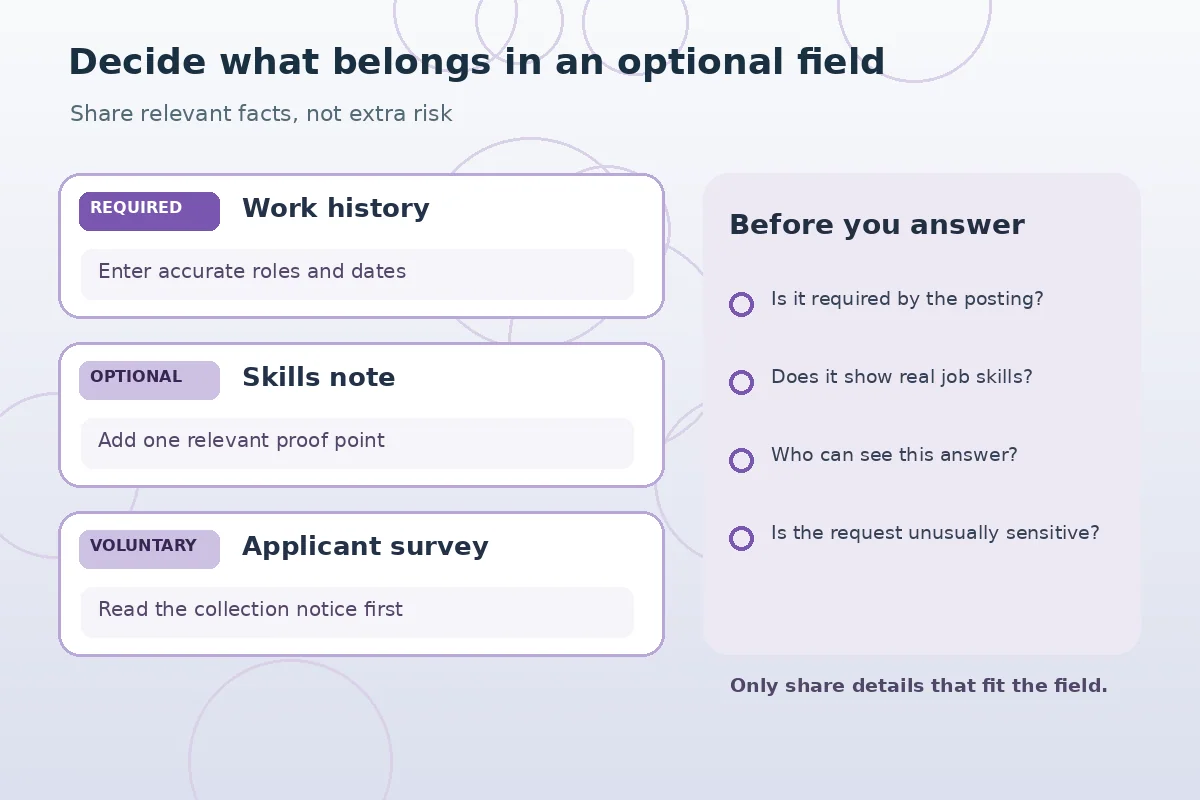
Before selecting an option, read the employer’s explanation of who can see the response and how it may be used. If the survey offers a decline-to-answer choice, you may consider it according to the notice. Never invent a category or falsely report credentials to appear more qualified. If a field is mandatory but confusing, use the platform’s help text or official support instead of guessing the legal meaning of the question.
Handle demographic surveys with proper context
Some employers collect voluntary demographic information for reporting or affirmative-action purposes. The EEOC discusses circumstances in which voluntary disability self-identification may be requested and provides restrictions on pre-offer disability questions. A general article cannot determine whether a particular employer’s exact form is lawful. Read the notice and examine the available choices before responding. A voluntary survey is different from an employer asking for medical details in a screening answer.
You do not have to write a medical history in a general Additional Information field to prove that you can perform a job. If you need an accommodation to participate in the application process, contact the employer through its stated accommodation route rather than publishing personal health details in an unrelated box. The EEOC explains that hiring systems must address accommodations under applicable rules; the right process depends on the situation and jurisdiction.
Evaluate requests for IDs, photos and financial data
A free-text field that invites bank details, a Social Security number, a driver’s license photograph or payment information before hiring should make you stop and verify the posting. The FTC warns that employment scams may mimic well-known businesses and use apparently official forms. This does not mean that employers never collect identity or payroll information later in a legitimate process; it means timing, purpose and the authenticity of the request are important.

Return to the employer’s known careers website instead of using a contact link embedded in a suspicious recruiting message. Do not upload financial data merely to make an optional box look complete. If the request concerns a regulated role, eligibility document or background process, ask the real employer for instructions rather than using a general blog rule. Avoid saving sensitive files into a public or shared portfolio folder for convenience.
Use an additional-information field for one useful detail
A practical format is Task, Evidence, Relevance. For example: ‘In a supervised class project, I reconciled inventory spreadsheets and documented exceptions; the same accuracy habits fit the purchasing assistant role.’ This is a hypothetical example and should be adapted only to actual experience. It adds context without claiming authority over orders, finances or systems that a student has never controlled.
If the box requests an explanation of job changes, consider whether the posting actually asks for it and whether the resume already gives necessary dates. Avoid naming former colleagues, clients or confidential workplace matters. A recruiter can evaluate a specific, truthful example without receiving sensitive third-party data. If you would not want the sentence forwarded to a hiring panel, reconsider whether it belongs in an optional field.
Review social media and personal website prompts
A field for LinkedIn, a portfolio or another profile is not a request to disclose every personal account. If you choose to include a link, verify that it opens publicly or with the permission you intend, reflects your own work accurately and does not expose people without consent. A private social account may have no bearing on the position. An empty optional profile field is preferable to linking irrelevant or inaccessible content.
Some portals allow an uploaded portfolio instead of a website. Confirm whether the employer asks for the file or an accessible URL. If you have employer-owned work or client records, do not post them without permission, even if the work demonstrates a skill. Share a fresh demonstration or a sanitized example only when the material can legitimately be shared and you label what is illustrative.
| Field type | What to check | Possible action |
|---|---|---|
| Relevant additional skills | Specific job connection | One supported example |
| Voluntary demographic survey | Purpose and privacy notice | Use stated response choices |
| Personal website | Permission and public access | Link only if useful |
| Unusual sensitive request | Employer authenticity and timing | Verify before proceeding |
Check the form without trying to game it
Avoid claims that filling every optional box improves algorithmic ranking. You cannot infer a portal’s scoring logic from the presence of a field. Focus on the job criteria, document accuracy and instructions. Do not enter keywords that you cannot support, fabricate an additional qualification or paste the entire job posting into a comment field. The best extra detail is one that a hiring reviewer can verify and connect to the work.
A hypothetical applicant sees fields for a personal website, a short skills note and a voluntary survey. They leave the website blank because it contains private family photos, add a concise example of real spreadsheet work, and read the survey notice before choosing an available response. This is a reasonable, selective approach—not a universal legal instruction or a prediction about hiring decisions.

Escalate ambiguous or inappropriate prompts safely
If a required question appears unrelated to the job or asks for medical facts before an offer, save the non-sensitive wording and ask the verified employer for guidance. EEOC resources explain that disability-related pre-offer inquiries are restricted and that recruitment practices must comply with applicable laws. Do not assume every legal rule is identical for all countries, employers or application stages.
An applicant can request process clarification without posting personal medical details in an online forum. Keep a record of the application URL, job requisition and exact field label. If the employer offers an accessibility or accommodation contact, use it for access barriers. If you suspect fraud, stop sharing information and check the employer’s legitimacy independently. The purpose of this review is an accurate, relevant application that protects unnecessary personal information.
How We Research Online Applications
JobAsk compared this specific reader question with the user-supplied WordPress post list and reviewed public search results and primary reference material on November 6, 2026. Examples are hypothetical and should never be treated as real applicant success stories. Application software, employer practices, legal requirements, accessibility and deadlines vary; confirm important details with the actual employer. See our affiliate disclosure.
Source: www.w3.org — W3C explains required versus optional fields, expected input formats and clear form instructions.
Source: www.eeoc.gov — EEOC explains restrictions on pre-offer disability questions and limited accommodation-related inquiries.
Source: www.eeoc.gov — EEOC explains fair employment inquiry practices and protection from unlawful discrimination.
Source: www.eeoc.gov — EEOC explains that voluntary disability self-identification may be requested in certain affirmative-action contexts.
Source: consumer.ftc.gov — FTC warns that fake recruiters and sites seek money and sensitive information before legitimate hiring.
Related Job Search Guides
No universal rule requires every optional box to be completed. Read the label; add relevant accurate details when they help and follow portal instructions.
Yes, when the portal genuinely marks it optional and you have no suitable professional site to share.
No. Read the separate survey notice and relevant response options rather than treating them as job-performance evidence.
EEOC guidance restricts pre-offer disability questions. Seek clarification from a verified employer or appropriate assistance if the request appears improper.
Do not volunteer sensitive identifiers into a general comment field. Verify any genuine identity-document request through an official employer process.