
Resume tables and floating text boxes can make a page look organized while leaving important information out of the text sequence. For a broadly compatible resume, prefer a single flowing column with ordinary paragraphs, clear headings and simple bullets. If your resume already uses layout tables, copy its text into a plain-text editor and read it in order. Check that each job title still belongs with the correct employer, dates and achievements. This is a readability test, not a guarantee about every applicant-tracking system.
Understand the difference between a data table and a layout table
A data table has meaningful rows and columns, such as a comparison of tools and proficiency levels. A layout table is built only to position a left column of dates beside a right column of job descriptions. Layout tables may look neat, but a converted text stream can read all dates first and all jobs afterward. Microsoft’s accessibility guidance favors simple tables used for actual data and warns that merged or nested cells complicate screen-reader navigation.
For a resume, consider whether a grid is truly necessary. Instead of one cell with “2022–2024” and another with “Operations Assistant,” use a normal line containing role, employer and dates, followed by bullets. Keep the association explicit. The fact that a Word file looks correct does not establish how an external form, PDF extractor or employer system will handle the cells.

Locate content trapped in floating text boxes
Templates sometimes place contact details or skills in floating text boxes. A person sees the box on the side; a text reader may encounter it out of sequence or not at all. NIST’s federal application guidance explicitly cautions against tables, text boxes, columns and other complex formatting. For private-sector resumes, software behavior varies, so the practical principle is to avoid relying on floating objects for essential facts.
Move the candidate name, contact method, employer names, dates, credentials and qualifications into the ordinary document text flow. A decorative block can remain in a portfolio presentation if the application allows it, but it should not be the only place that contains required information. Never place a license number or security-sensitive personal detail into a design layer merely because it looks official.
Rebuild a two-column resume without losing proof
Imagine a hypothetical resume with years in a narrow left column and two lines of job duties in the right. The plain-text output reads “2020, 2022, 2024,” then lists unrelated employers. That is a warning. Rebuild the information as complete job entries, with one header line for role, organization and dates and a few specific, true achievement bullets. The result may take more vertical space, but it restores the relationship among facts.
Do not solve the problem by removing job dates, replacing bullets with image icons, or shrinking text. If the resume grows, shorten repeated duties or move less relevant entries lower. A simple layout can still include clean spacing, modest bold emphasis and clear alignment. The objective is a complete sequence of evidence, not a bland page. Keep the source document so you can compare the exact facts before and after.
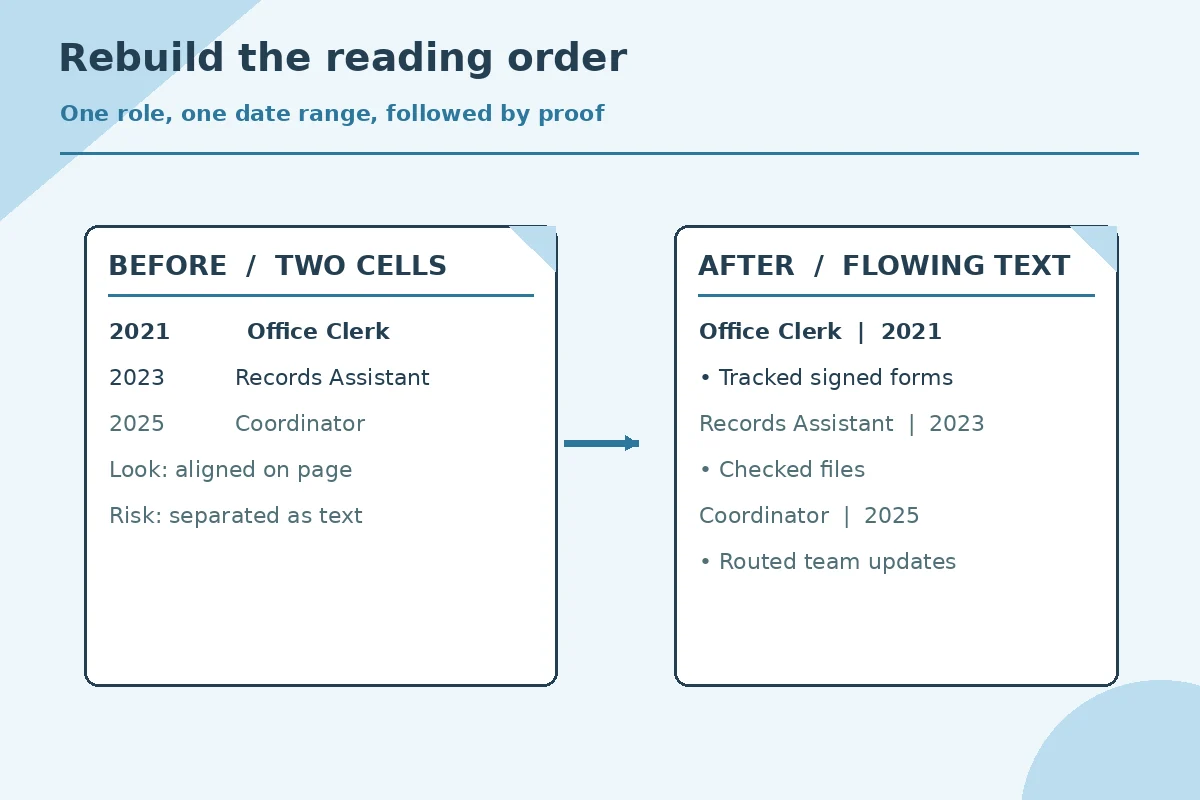
Run a human and text-extraction audit
Open the exported PDF and first scan it normally for broken columns, missing words, or heading changes. Next, select and copy its text into a plain-text editor. Read it from top to bottom: name, contact information, summary if used, employer, role, dates, achievements, education and credentials. If a date appears far from the employer it describes, revise the document and export again. Check for symbols that turn into meaningless characters.
The test is deliberately modest. Being able to select text does not mean any particular ATS accepts the resume or scores it highly. It only reveals obvious conversion defects. If the employer requires a DOCX, inspect that version as well. USAJOBS has its own documented resume-builder process and warns that formatting pasted from Word may not survive; it describes a plain-text conversion option for that situation.
| Situation | Action | Check |
|---|---|---|
| Dates in narrow table cell | Role and date on same text line | Check plain-text sequence |
| Skills in floating box | Real Skills paragraph or section | Verify copied skills appear |
| Merged multi-column cells | Ordinary single-column entries | Read role, employer, dates in order |
| Decorative icons as labels | Explicit text headings | Check labels without graphics |
Treat federal submissions as a special requirement
Current USAJOBS guidance limits resumes to two pages and asks applicants to follow the job announcement. NIST states that federal submissions should avoid non-text graphics, tables, columns and text boxes that may interfere with evaluation. If applying to a federal agency, follow the current announcement and agency instructions rather than a beautiful private-sector template or an old guide that gives different page limits.
Federal resumes may need details that a private employer would not ask for, such as hours worked per week or explicit specialized experience. Removing such evidence merely to preserve a layout can weaken the application. Confirm the actual required details first, then construct a simple document that presents them in order. Do not assume private-sector employers share all federal rules; the specific employer and submission instructions control.

Review the final attached file, not just the editing canvas
Save the exact file you intend to send under a clear version name. Reopen that file on a different viewer where practical and inspect every section, especially the first and last lines. Verify the contact information is selectable text, links work if included, and dated entries remain together. If submitting through an application portal, follow the file type and size rules rather than converting every document to the same format by habit.
Keep a short QA note for yourself: extracted text passes, no essential facts inside floating boxes, resume sections remain clearly labeled, and the final file matches the chosen vacancy. A layout repair is worthwhile when it makes information easier to understand. It is not worthwhile when it replaces factual achievements with vague slogans or decorative elements, no matter how attractive the design becomes.
How We Research Resume Layout and Export Requirements
We reviewed these primary university, government, and software documentation sources on November 7, 2026. Guidance varies across job sectors, and federal application rules have changed; always read the current employer announcement. The resume examples here are hypothetical and are not actual candidate records. www.nist.gov (NIST specifically warns against columns, tables, text boxes and complex formatting in federal resumes.) support.microsoft.com (Microsoft recommends simple data tables, built-in styles and checking accessible reading order.) help.usajobs.gov (USAJOBS warns pasted formatting may not survive in the resume builder and documents a plain-text repair route.) careercenter.ucdavis.edu (UC Davis recommends simple readable formatting and clear headings for resumes.)
These guides are informational and carry no paid template rankings or verified software partnerships. Read the site affiliate disclosure for how any commercial relationship would be identified. No layout technique guarantees screening results or an interview invitation.
More Resume and Cover Letter Guides
Not for every employer, but layout tables add avoidable conversion risk. NIST advises against them for federal resumes.
Behavior varies by system and file conversion. Do not depend on floating text boxes for required contact or qualification information.
Copy the final PDF text into a plain-text editor and check whether each role, employer, date and bullet reads together.
No. Preserve relevant facts, simplify formatting and edit repeated material. Follow a specific page limit when the application requires one.
No. It helps detect missing or scrambled text, but employer systems differ and screening involves much more than layout.