
An internship application tracker must do more than list companies. Student applicants may be handling semester schedules, transcript requests, work samples, faculty references, academic approval steps and overlapping recruiting windows. Start with one row per internship opportunity, then separate the employer’s submission deadline from school-specific or program-specific steps. The University of Southern California notes that internship recruiting timelines differ by industry and employer, while the University of Michigan recommends tracking applications and deadlines. Use the actual posting and your own school’s instructions as the source of truth.
Record the Employer Requirement Before Planning a Deadline
For each internship, write the organization, exact role, location or work mode, term, official posting URL, requisition ID, stated deadline and time zone if provided. A campus event announcement is not necessarily the complete employer application instruction. If the posting links to a different official portal, verify which action actually submits the application. Some programs use rolling review; that does not justify inventing a fixed closing date. If a deadline is not stated, record “Not specified” and your planned check date separately.
A fictional student sees a summer research assistant posting with a stated deadline, and a marketing internship with no deadline listed. The research row carries the employer’s real date. The marketing row says “deadline unknown; verify official posting” rather than copying the research date. This matters because missing a real deadline is different from waiting for an employer to publish one. Put reminders ahead of known deadlines, but label them personal work dates, not promises from the employer.
Keep Resume, Transcript, and Portfolio Versions Distinct
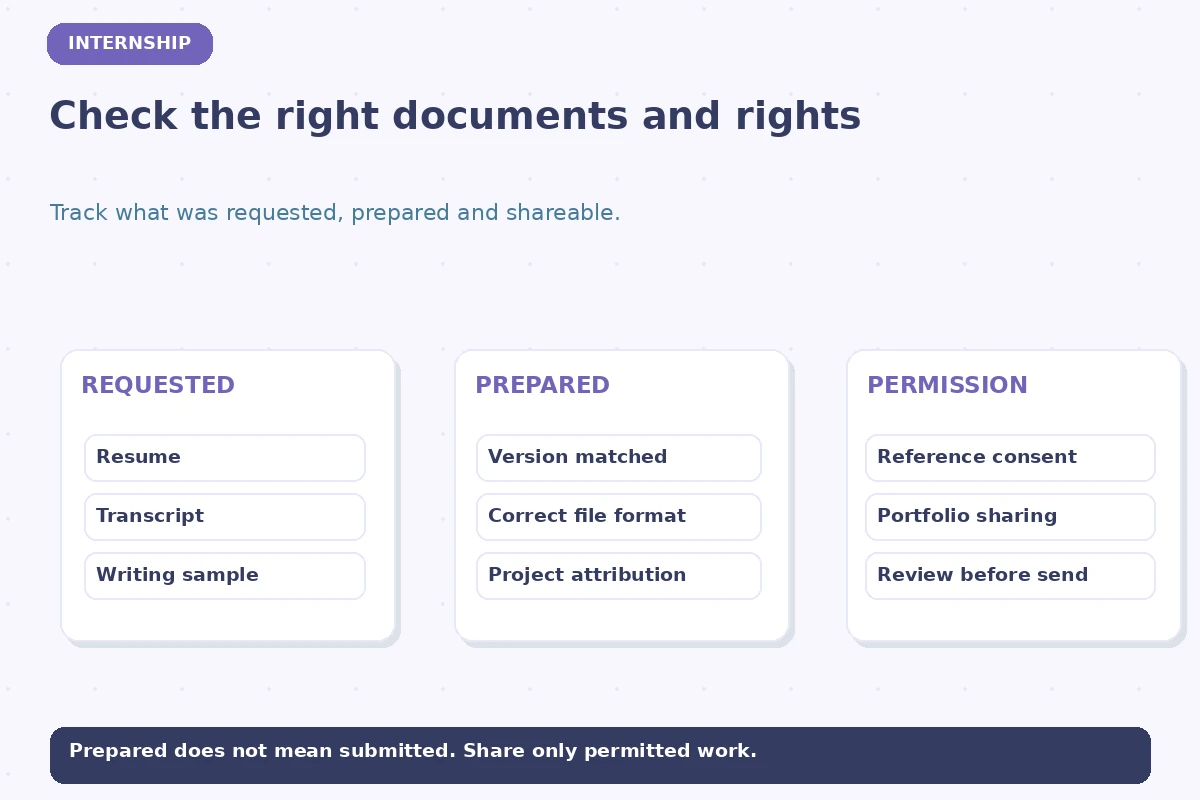
Add a Documents Required field and a Materials Prepared field. The first should reflect the posting: resume, cover letter, transcript, writing sample, portfolio, work authorization question, or requested references. The second records what you actually completed. Use filenames such as “resume-research-v2.pdf” or “portfolio-public-link-reviewed” rather than pasting private materials into a shared tracker. Avoid sending unofficial transcripts when the employer specifically requests a different format; read the exact instructions before attaching anything.
A strong materials checklist asks whether your work sample is yours to share and whether a team project accurately credits contributors. If the application asks for a faculty reference, seek that person’s permission before listing them. Do not claim a credential or laboratory skill you have not earned. An internship is a supervised learning opportunity in many contexts, not proof you can independently perform restricted professional duties. Keep a short evidence note so the submitted version can be reconstructed if you are interviewed weeks later.

Separate Academic Eligibility From Employer Application Status
A college may require registration, credit approval, faculty oversight or an internship agreement before certain positions can count toward degree requirements. Those requirements vary, so create two fields: Employer Process and School Requirements. “Submitted to employer” does not mean “Approved for academic credit.” If the internship requires a particular major, year of study, course, background check or authorization, record the published condition and the place where you can confirm it, without assuming that every student qualifies.
For instance, a student may receive a positive employer response before their department reviews a proposed credit arrangement. The tracker can show “Employer interview scheduled” alongside “School approval: not yet requested.” That is honest and useful. Do not invent a universal internship-pay rule, work-authorization decision, clearance requirement or academic deadline. Seek guidance from the relevant school office and employer for eligibility questions that depend on your situation.
| Field or decision | Record this | Do not assume |
|---|---|---|
| Employer deadline | Posting and time zone | Use official role-specific date |
| Materials | Resume, transcript, sample | Check exact requested formats |
| School requirements | Credit or adviser approval | Separate from employer stage |
| Submission evidence | Portal or email receipt | Confirm before marking Applied |
Manage Multiple Recruiting Calendars Without Guesswork
Internship deadlines can span semesters. USC advises students that recruiting schedules may differ significantly across organizations and fields; the broad calendar is not a substitute for each opening’s posting. Create a calendar of your actual application, interview and decision deadlines. Keep dates for student organization events or career fairs separate from employer submission dates. If an employer says “applications reviewed as received,” start the preparation process promptly but do not record an imaginary cutoff.
For each internship, choose a personal preparation date before the known deadline. Allow time for transcript access, writing sample review and reference permission. When you work on several opportunities, prioritize fixed due dates and requirements outside your immediate control. A spreadsheet may highlight “Prepare reference request” without claiming the recommender has agreed. After an interview, add the date and what the interviewer actually said about the next step. Silence is not an automatic rejection.
Track Confirmation, Interview, and School Follow-Through
Use separate columns for date actually submitted, submission evidence, interview stage, next action and next-action date. If a portal times out while uploading, verify the official status or confirmation rather than assuming success and resubmitting blindly. Save a neutral reference to your final resume and cover letter versions. When an interviewer requests a project sample, verify that the sharing permissions allow intended access without revealing confidential research data or another person’s information.
After an offer, the tracker should switch from applying to confirming practical conditions: actual term dates, reporting location, supervisory contact and any college approval procedure. You do not need to store sensitive onboarding files in your job-search spreadsheet. The FTC warns about job scams requesting financial information prematurely, including imitation recruiting messages. Use official employer channels for personal documentation and do not pay an unexpected fee to secure an alleged internship.

Work Through a Fictional Two-Internship Example
Imagine Alex pursuing a museum internship that requires a writing sample and an engineering internship that asks for coursework and a project portfolio. The museum entry says “Sample revised; faculty reviewer permission confirmed; final PDF not submitted.” The engineering entry records a verifiable project link, the role’s specific requirements and the employer deadline. Once Alex receives a confirmation for the museum submission, only that row changes to Submitted. An interview request for engineering changes its employer stage, not its school-credit status.
During the weekly review, Alex checks the actual closing dates, requests any missing permissions and prioritizes the next concrete task for each opportunity. If an academic adviser explains that an internship cannot count for credit, that fact goes in the separate school requirements field. It does not change whether the employer received the application. The finished tracker preserves the difference between opportunity, eligibility, materials, submission and approval—and avoids mixing professional outcomes with academic paperwork.
How We Research and Check This Guide
This U.S.-focused guide was checked on 2026-11-13 against directly relevant product documentation and/or authoritative university and federal guidance: University of Michigan Career Center, USC Career Center, Federal Trade Commission. The sample rows, people, roles and dates above are hypothetical illustrations. Employer processes vary; official application instructions and verified correspondence control your real next step. A personal tracker cannot predict acceptance or rejection. Read our affiliate disclosure; no partnership or hiring result is implied.
Related Job Search Guides
Only if credit matters to your situation; keep employer and school processes distinct.
Record the posting’s exact language and a personal preparation date, not an invented final cutoff.
Not unless it actually fulfills the employer’s stated application procedure.
No. Use private approved channels and record only a safe document-version label in your tracker.
No. Confirm any needed credit approval or internship agreement with the appropriate school office.